
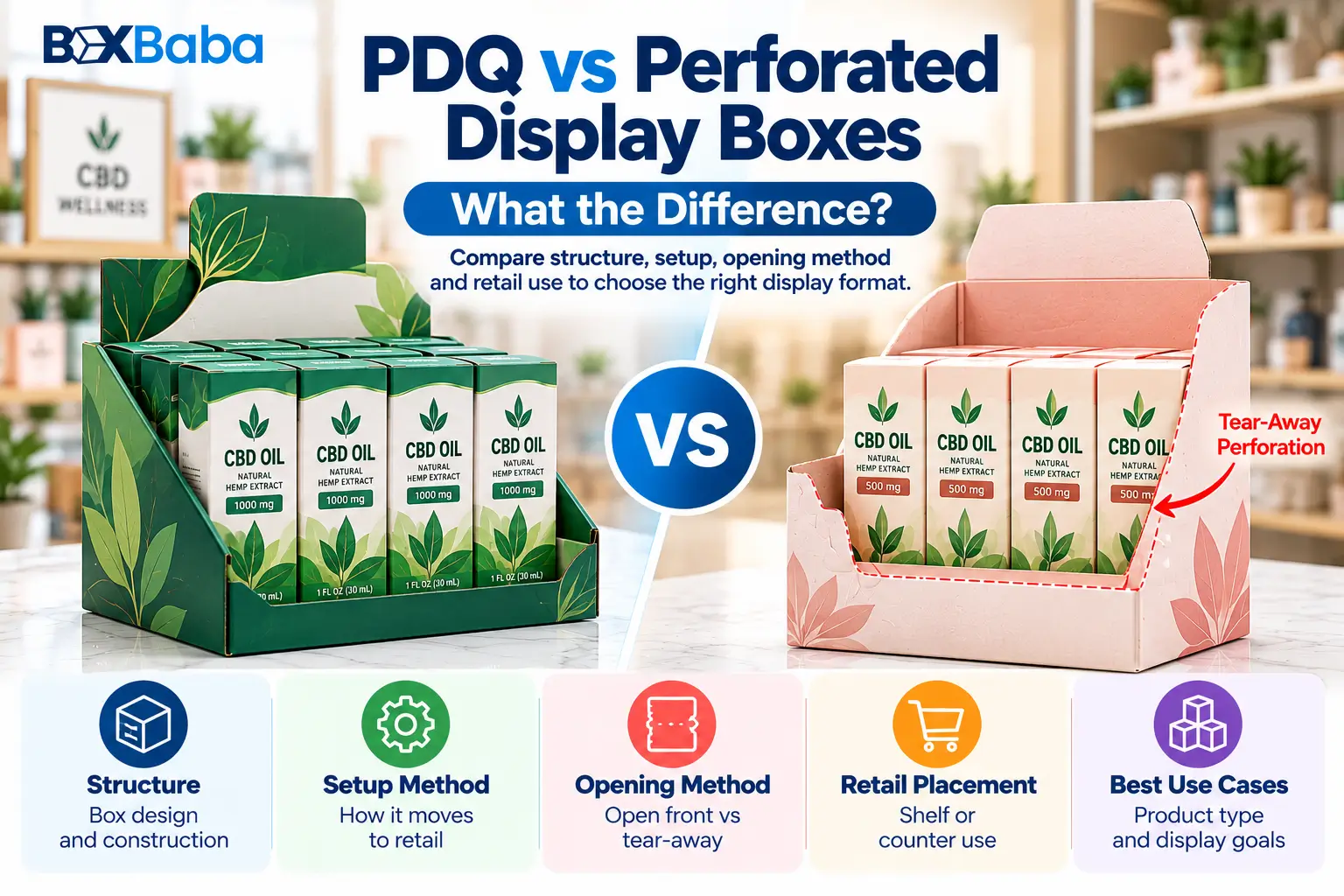
The main difference between a PDQ display and a perforated display box is the requirement each term describes.
A PDQ describes the retail-deployment workflow: products are organized so they can move into retail presentation with limited store-level setup.
A perforated display describes a structural conversion method: an intentional tear line allows part of the packaging to be removed so the remaining structure becomes or exposes the retail display.
In short:
PDQ → How the merchandise moves into retail presentation
Perforated Display → How the packaging physically converts
One structure can be both.
A PDQ may use a perforated tear-away section, but PDQ does not automatically require perforation. Likewise, the presence of a tear line does not automatically make a display a PDQ.
For the wider range of retail merchandising structures, explore BoxBaba Custom Display Boxes.
PDQ vs Perforated Display at a Glance
Decision Factor | PDQ Display | Perforated Display |
Primary classification | Retail-deployment workflow | Structural conversion |
Main question | How should the arranged products move into retail presentation? | Does part of the structure need to tear away? |
Defining requirement | Organized, quick retail setup | Planned perforated removal |
Requires perforation? | No | Yes |
Automatically a PDQ? | — | No |
Can be used on a counter? | Yes | Yes |
Can be used on a shelf? | Yes | Yes |
Can products travel inside it? | Depends on the project | Depends on the project |
Can use holders or dividers? | Yes | Yes |
Can one project use both concepts? | Yes | Yes |
The comparison is therefore not between two mutually exclusive box styles. It is between workflow and conversion.
What Is a PDQ Display?
PDQ is commonly used for an organized product-display arrangement intended for quick deployment in retail.
Its relationship is:
Finished Products → Defined Arrangement → Prepared Retail State → Store Deployment
A PDQ may use an open tray, removable cover, dividers, product lanes, holders or a tear-away component depending on the actual project.
What defines the PDQ context is not one box shape.
The key question is:
How will this organized assortment move into its selling configuration?
When product count, arrangement and quick retail placement lead the brief, BoxBaba PDQ Trays and Boxes provide the relevant commercial direction.
What Is a Perforated Display Box?
A perforated display is defined by an intentional tear-away feature.
Its structural relationship is:
Closed Structure → Perforated Line → Controlled Removal → Remaining Display State
The removable area might be a front panel, upper section, cover or another intentionally designed part of the structure.
The important point is that perforation describes how the packaging converts.
It does not tell you whether the merchandise follows a PDQ workflow, whether the products travel inside the display or where the finished structure will sit.
PDQ Describes Workflow; Perforation Describes Conversion
Consider two different questions.
Question 1: How should the products reach retail presentation?
If the answer is:
The merchandise should already be organized for quick store deployment.
the project has a PDQ requirement.
Question 2: How should the packaging change during store setup?
If the answer is:
A panel should tear away to expose the merchandise.
the project has a perforated conversion requirement.
Those requirements can exist independently or together.

Four Possible Project Configurations
A useful way to avoid confusing the terminology is to separate the project into four possible cases.
PDQ Without Perforation
The products are organized for quick retail deployment, but no tear-away panel is needed.
For example, the merchandise may already sit in an open tray or use a removable non-perforated cover.
Perforated Display Without a PDQ Workflow
The structure uses a tear-away section, but the merchandise may be loaded later or follow another retail setup process.
The perforation exists even though quick pre-arranged deployment is not the dominant requirement.
PDQ With Perforation
The merchandise is organized for quick deployment and the structure also needs a tear-away conversion.
The workflow becomes:
Organized Products → Store Setup → Tear-Away Conversion → Retail Display
In that case the same structure is accurately described as both PDQ and perforated.
Neither Is the Dominant Requirement
Some displays are assembled and loaded independently and do not require tear-away conversion.
They may be better classified by placement, product geometry or another display attribute.
This four-state model is more useful than forcing every project into only one label.

Design the Remaining Display Before Locating the Tear Line
For a perforated structure, do not begin with:
Closed Box → Add Perforation
Start with the retail state that must remain after conversion.
Ask:
- What products remain inside?
- How many units are presented?
- Which panels stay?
- Which section is removed?
- Which product faces must remain visible?
- How will shoppers remove merchandise?
- What support must remain functional?
Then work backward:
Required Retail Display → Remaining Structure → Removed Section → Perforation Position → Closed Configuration
This makes the tear-away feature part of the structural solution instead of a decorative cut added after the box has already been designed.

The Remaining Structure Matters More Than Maximum Product Exposure
Removing more material does not automatically create a better display.
The retained structure still needs to serve the actual merchandise.
For example, the front and side geometry can affect:
- product retention;
- visible product area;
- shopper access;
- remaining support;
- available printed surfaces.
A lower front can expose more product but may provide less retention.
A higher front can hold merchandise more securely but may cover too much of the retail package or make removal awkward.
The correct relationship is:
Controlled Conversion + Functional Remaining Display
rather than simply:
Maximum Tear-Away Opening
No universal front-wall or tear-away dimension should be assumed; the geometry depends on the actual product and structure.

Perforation Position Should Follow the Product Arrangement
The tear line should be developed in relation to the merchandise, not independently from it.
Relevant inputs include:
- finished product height;
- product orientation;
- shopper-facing panels;
- rows or lanes;
- remaining retaining walls;
- internal support.
A perforation positioned too low may remove more structure than the final display needs.
One positioned too high may leave a panel that hides important parts of the merchandise or restricts access.
Therefore:
Finished Products → Retail Arrangement → Remaining Display Geometry → Perforation Position
is a more reliable sequence than starting from the closed case alone.

Product Support Must Still Work After Conversion
If the display uses dividers, product lanes or individual supports, those components need to remain functional after the tear-away section is removed.
The conversion should not leave the product-support system loose, unsupported or obstructive.
That requirement applies whether the project is PDQ, perforated or both.
The deeper question of when a retail display needs dividers or product lanes belongs to its separate engineering guide; here the key principle is simply:
Conversion Must Preserve Product Support
PDQ Does Not Automatically Mean Shipper-to-Display
PDQ describes the deployment context.
It does not by itself prove that the same display has been engineered to function as distribution packaging for the complete loaded product configuration.
If the merchandise travels inside the display system, both states may need to be considered:
Packed / Distribution State
and:
Retail Display State
The broader Retail-Ready Display Packaging guide owns that distribution-to-retail relationship.
For DB-08, the important point is:
PDQ Workflow ≠ Automatic Shipping Specification
Perforation Does Not Automatically Mean Shelf-Ready
A package does not become retail-ready merely because a panel can be torn away.
After conversion, the structure still needs to suit its final retail purpose.
Consider:
- final footprint;
- product visibility;
- shopper access;
- product retention;
- remaining structure;
- applicable retailer requirements.
The tear-away mechanism is only one part of that project.
Where the broader in-store presentation and merchandising environment leads the decision, BoxBaba Retail Display Boxes provide the relevant commercial context.
Counter Placement Is a Separate Attribute
A display can also be PDQ, perforated and counter-based at the same time.
For example:
Organized Product Arrangement
Tear-Away Front
Checkout Placement
could produce a structure that is:
PDQ
by deployment workflow,
Perforated
by conversion mechanism,
and:
Counter Display
by retail placement.
If available countertop space is the dominant project constraint, BoxBaba Counter Display Boxes provide the corresponding placement-led direction.
This reinforces an important Display Boxes taxonomy principle:
One structure can have several valid classifications when each term describes a different attribute.
When Should You Start With a PDQ?
Start with PDQ when the leading requirement is:
This organized assortment must move into retail presentation with limited setup.
The brief should identify the product count, SKU arrangement, orientation, retail location and intended store setup.
Whether perforation is required can then be decided separately.
Do not choose PDQ merely because a sample image happens to show a tear-away panel.
When Should You Start With a Perforated Display?
Start with perforation when the leading structural requirement is:
Part of this packaging must tear away so the remaining section becomes or exposes the retail display.
The brief should identify:
- what is removed;
- what stays;
- intended product opening;
- shopper access;
- product retention;
- retail location.
The perforation should serve the final display rather than being treated as a cosmetic structural feature.
When Should You Use Both?
Use both when the project has two genuine requirements:
Quick Organized Retail Deployment
Controlled Tear-Away Conversion
For example:
Organized Product Case → Tear-Away Panel → Shopper-Ready Tray
In this case, there is no reason to choose only one term.
The more useful project brief is:
PDQ Workflow + Perforated Conversion
because it tells the structural supplier both how the merchandise should reach retail and how the packaging should change during setup.
PDQ vs Perforated Display Decision Framework
Main Project Requirement | Start With | Reason |
Organized merchandise needs quick retail deployment | PDQ | Deployment workflow leads |
A panel or section must tear away during store setup | Perforated Display | Conversion method leads |
Quick deployment and tear-away conversion are both required | Both | Workflow and conversion both matter |
Display reaches retail already open with no tear-away step | PDQ may apply | Perforation is unnecessary |
Structure tears open but products are loaded separately later | Perforated Display | Tear-away can exist without PDQ workflow |
Available checkout space is the dominant constraint | Counter Display | Placement leads |
Wider in-store presentation is the dominant requirement | Retail Display | Merchandising context leads |
The final structure still has to be developed around the actual products, retail footprint and retailer requirements.

Common PDQ vs Perforated Display Mistakes
Treating the Terms as Synonyms
PDQ describes retail deployment, while perforation describes structural conversion.
Better approach: define the two requirements separately.
Assuming Every PDQ Needs a Tear-Away Panel
A PDQ can use another setup method.
Better approach: add perforation only when conversion requires it.
Assuming Every Perforated Display Is a PDQ
The structure may use tear-away geometry while following another loading or retail workflow.
Better approach: confirm how the products actually reach their selling state.
Designing the Tear Line Before the Retail Display
A perforation can open successfully and still leave a poor display.
Better approach: define what must remain first.
Removing Too Much Structure
Greater product exposure is not automatically a better structural result.
Better approach: balance visibility, retention and access.
Ignoring Internal Support After Conversion
Dividers or holders can become ineffective if the removed panel supports them.
Better approach: verify the support system in the final open state.
Assuming Generic Terminology Means Retailer Approval
Retail programs can have project-specific requirements.
Better approach: use the applicable retailer specification where one exists.
What Information Should You Prepare?
Before deciding between PDQ, perforated or both, prepare:
- finished product dimensions;
- finished unit weight;
- total product quantity;
- number of SKUs;
- units per SKU;
- intended arrangement;
- shopper-facing orientation;
- final retail footprint;
- panels that must remain visible;
- intended store-setup process;
- whether products travel inside the structure;
- whether a section must tear away;
- divider or holder requirements where known;
- applicable retailer specification;
- total order quantity.
These inputs separate the deployment requirement from the conversion requirement and make the structural brief more precise.
Choosing PDQ or Perforated Display Packaging With BoxBaba
If organized, quick retail deployment leads the project, explore BoxBaba PDQ Trays and Boxes.
If tear-away conversion is required, define the intended remaining display state, product arrangement and perforated section before the structure is finalized. The dedicated Perforated Display Boxes commercial page should be linked here once its final URL is live.
If the project combines placement, workflow and other display requirements, use the broader Custom Display Boxes category as the commercial starting point.
BoxBaba MOQ starts from 100 units on most product lines. Artwork assistance, dieline support and digital 3D mockups are available during development. Eligible standard projects may have production turnaround starting from 5–9 business days after specifications and artwork approval, depending on structure, material, quantity, sampling, finishing and other project requirements.
Free USA shipping is available on eligible custom packaging orders.
Frequently Asked Questions
What is the main difference between a PDQ and a perforated display box?
PDQ primarily describes a quick retail-deployment workflow. A perforated display describes a structure with an intentional tear line that allows part of the packaging to be removed during setup.
Does every PDQ display use perforation?
No. A PDQ can use an open tray, removable cover or another setup method. Perforation is one possible conversion mechanism.
Can a perforated display exist without being a PDQ?
Yes. A structure can use tear-away perforation while being supplied empty or following another retail-setup process.
Can one display be both PDQ and perforated?
Yes. If products are organized for quick retail deployment and a tear-away panel is also used to create the final retail state, both classifications can accurately describe the same structure.
Is a PDQ automatically a shipping case?
No. PDQ terminology alone does not establish that the display is suitable for the project loaded distribution conditions. Shipping requirements must be reviewed separately.
Does perforation automatically make a package shelf-ready?
No. The converted structure must still fit the retail environment, retain the products and provide suitable shopper access.
What should I send BoxBaba for a PDQ or perforated display project?
Provide the finished product dimensions and weight, quantity, SKU arrangement, final retail footprint, intended store-setup workflow, required tear-away section where applicable and any retailer-specific requirements.