
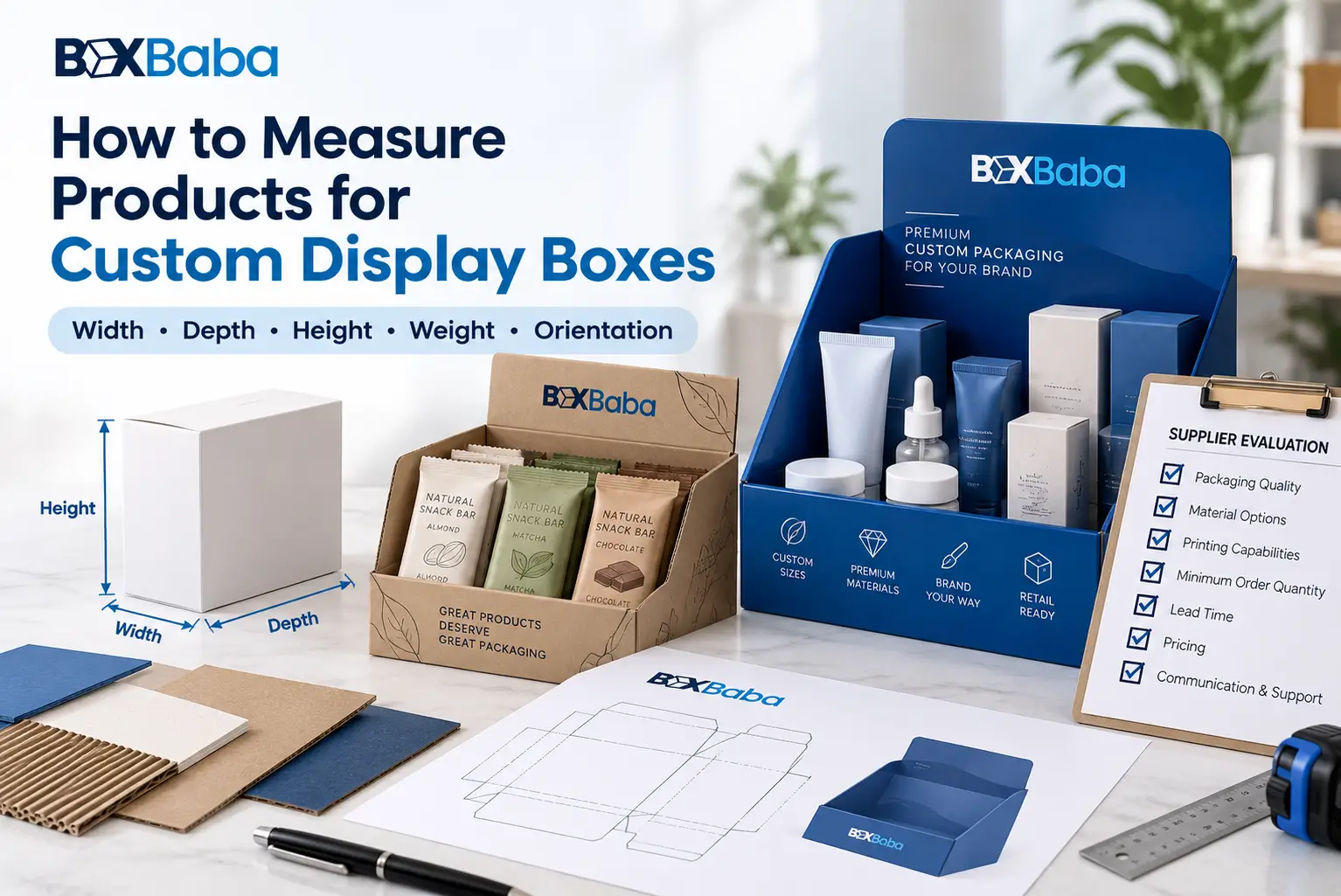
To measure a product for a custom display box, start with the finished retail-ready unit exactly as it will enter the display.
Do not begin with an estimated display size, nominal fill capacity or empty container. Measure the product maximum external profile, include any closure or projection that changes that profile, record the complete finished unit weight and confirm how the merchandise will face and sit in the display.
A practical measurement sequence is:
Finished Retail Unit → Maximum External Profile → Closure / Projection → Base Profile → Finished Unit Weight → Display Orientation → SKU-Specific Measurements → Display Planning
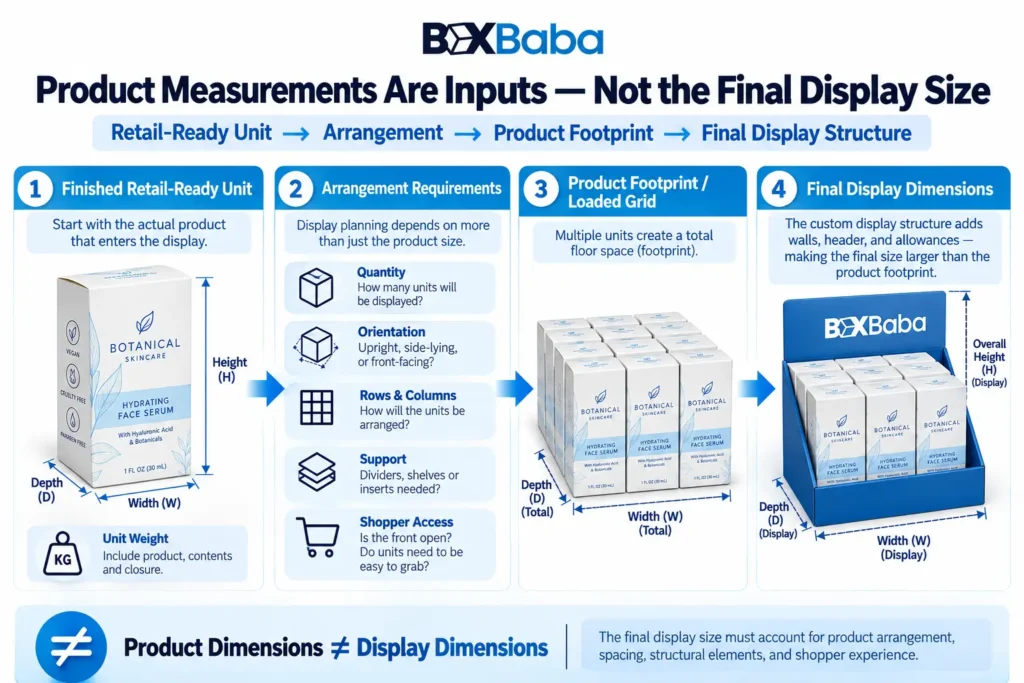
These measurements describe the merchandise. They are not automatically the final internal or external dimensions of the display.
Once the merchandise is documented, BoxBaba Custom Display Boxes range provides the commercial starting point for developing a retail display around the actual products.
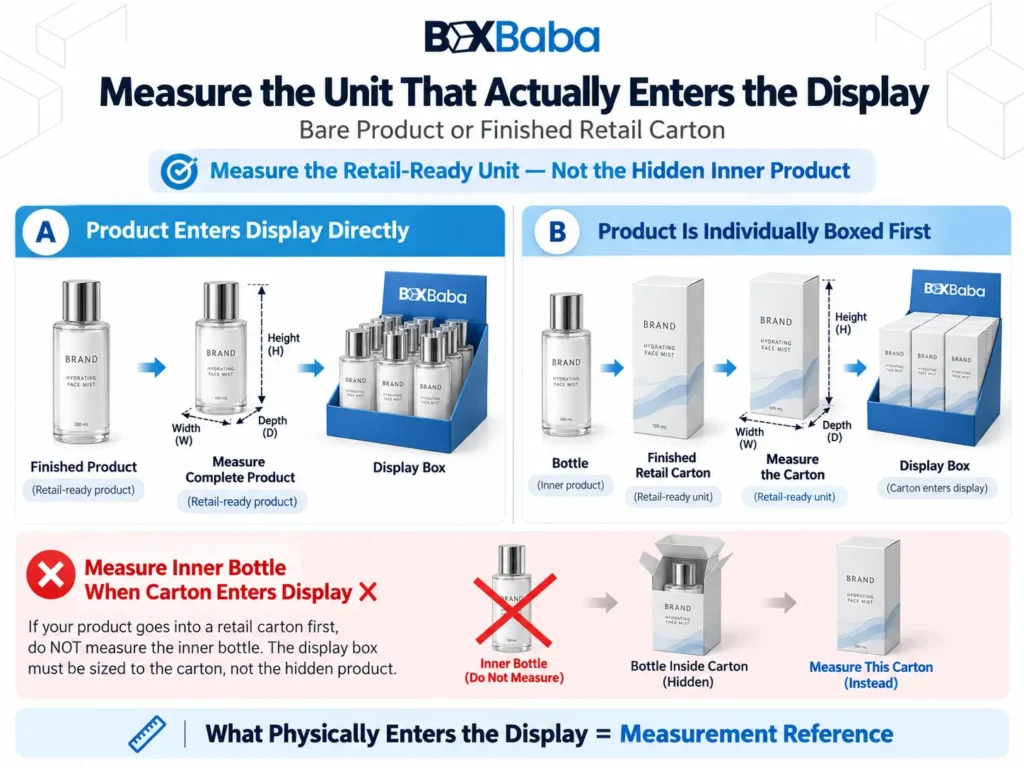
Start With the Unit That Will Physically Enter the Display
Before using a ruler or caliper, determine exactly what the display will hold.
There are two common relationships:
Primary Product → Display
or:
Primary Product → Individual Retail Carton → Display
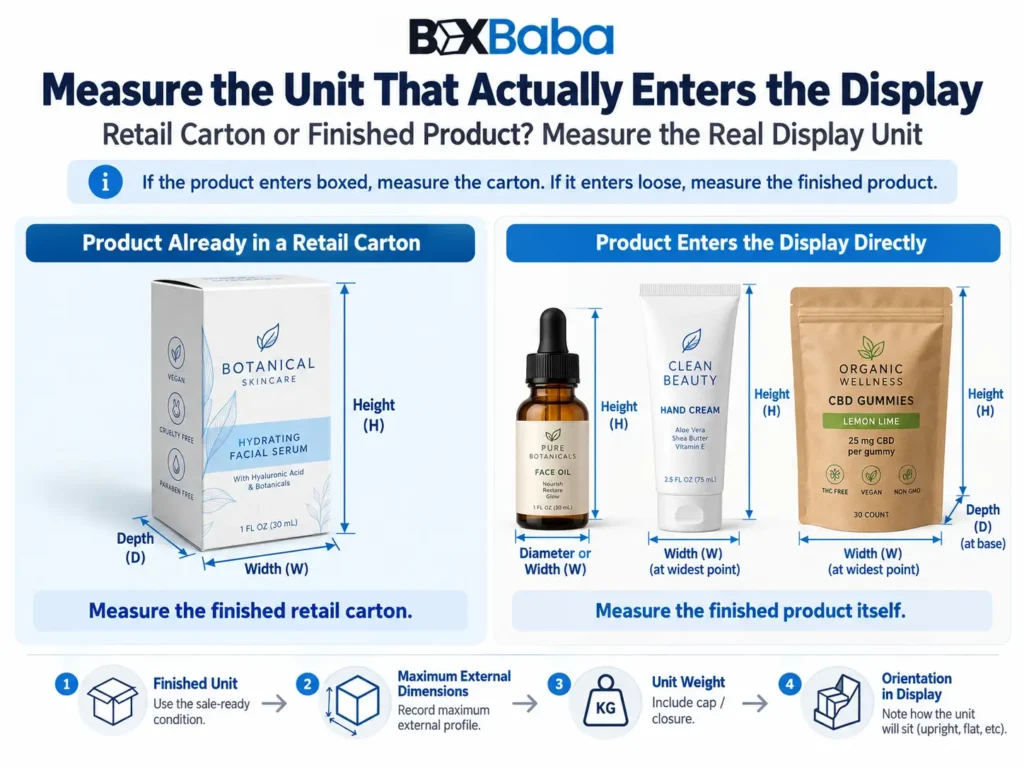
If a bottle will already be packed inside a folding carton before it reaches the display, measure the finished carton, because that carton occupies the display space.
If the bottle enters the display directly, measure the complete bottle instead.
The same principle applies to tubes, jars, pouches, bars, pens, sticks and other merchandise:
Measure the finished unit that the display physically holds.
For projects where product geometry itself is the main structural starting point, BoxBaba Product Display Box page provides the corresponding commercial context.
Measure the Product in Its Finished Retail Condition
The measurement sample should represent the merchandise in the same condition in which it will be displayed.
Where applicable, measure it:
- fully assembled;
- fully closed;
- filled where filling affects shape or weight;
- with the final cap, pump, dropper, lid or overcap installed;
- with fixed collars or decorative components attached.
This gives a more useful structural reference than measuring only one component.
For example:
Bottle Body Alone ≠ Finished Bottle
and:
Flat Empty Pouch ≠ Finished Filled Pouch
The completed retail unit is the measurement entity.
What Do You Need to Measure a Product?
Most projects do not require complicated equipment.
Useful tools include a rigid ruler or measuring tape, a flat surface and a scale for complete unit weight. A caliper can also help with smaller products or profiles where a ruler cannot clearly capture the controlling dimension.
Photos are useful for documenting closures and unusual shapes.
The goal is not to create a manufacturing drawing. It is to provide enough reliable information for the structural designer to understand the product true physical envelope.
Record the Maximum External Profile
For a rectangular product or finished retail carton, record:
Maximum Width × Maximum Depth × Total Height
For a consistently round product, record:
Maximum Diameter × Total Height
But do not assume that the main product body is always the widest point.
A cap, pump, shoulder, collar, lid, dropper or other feature may extend beyond it.
The controlling measurement is the furthest external point of the completed product in its intended display orientation.
For products that stand upright, also record the base footprint where it differs meaningfully from the maximum body profile. The base describes where the product actually contacts the display, while the maximum profile describes the total space it can occupy.
Product Measurements Are Not Display Dimensions
Label the numbers clearly as:
Finished Product Dimensions
not:
Display Box Dimensions
The display still has to account for quantity, arrangement, support, access and retail-space requirements.
Therefore:
Product Dimensions ≠ Final Display Dimensions
This distinction is critical because DB-03 is measuring the merchandise, not calculating the finished display.
Measuring Individually Boxed Products and Cartons
Finished cartons are usually the simplest display units to document.
Place the carton in its intended retail orientation and record the maximum width, depth and height.
Also note any fixed feature that extends beyond the basic rectangular body, such as a hang tab, handle, shaped top or attached component.
If that feature will remain on the package when it sits in the display, it belongs in the measurement specification.
The orientation should also be identified so the same three dimensions are not interpreted differently later.
Measuring Bottles, Jars and Their Closures
For bottles and jars, inspect the complete external profile rather than measuring only the center body.
Useful points to check include:
- base footprint;
- main body;
- shoulder;
- neck;
- cap or lid;
- pump;
- dropper closure;
- bulb where applicable;
- overcap or decorative collar.
For a consistently round unit, record maximum diameter and complete closed height. If a closure or shoulder creates different width and depth measurements, record those separately.
A product can therefore have more than one structurally meaningful profile.
For example:
Base Profile → Body Profile → Closure Profile → Complete Closed Height
This is especially relevant for Tincture Display Boxes, where the bottle body, closure and dropper profile can affect later spacing or holder decisions.
For cosmetic bottles, jars, pumps and beauty containers specifically, BoxBaba How to Measure Cosmetic Products for Custom Boxes guide provides the deeper cosmetic-container measurement workflow instead of repeating that entire topic here.
Measuring Tubes and Stick Products
Measure tubes in their complete closed and filled condition where filling changes the profile.
Record the maximum:
- total length or height;
- width;
- filled depth or thickness;
- cap profile;
- sealed or crimped end where relevant.
Flexible tubes may not maintain the same depth along their entire length, so use the maximum filled profile rather than assuming the flat tube width describes the complete unit.
For stick products such as lip balm, include both the fitted cap and base. Also confirm whether the product will stand upright or lie horizontally.
That distinction is particularly relevant for Lip Balm Display Box projects because orientation changes how the finished stick occupies the display.
Measuring Filled Pouches and Flexible Bags
Do not measure only an empty flat pouch.
Flexible packs can expand through their contents, side gussets, bottom gussets and closures.
Measure the finished filled package and record:
Maximum Filled Width × Maximum Filled Depth × Total Finished Height
Also identify any structural feature that changes the profile, such as a spout, zipper, sealed top, cap or hang feature.
Do not compress the package while taking the controlling measurement. The aim is to represent the normal finished retail profile.
If filled packs vary slightly from unit to unit, provide representative measurements and identify the largest observed finished profile rather than assuming the flat material dimensions will control the display.
This is particularly important for Snack Display Boxes, where a filled pouch can behave very differently from a rigid retail carton.
Measuring Irregularly Shaped Products
Some merchandise cannot be described adequately by one diameter or a simple box-like body.
For an irregular product, identify the smallest three-dimensional envelope that contains the complete finished profile in its intended orientation.
Record the maximum:
Width
Depth
Height
Then note any feature that could affect insertion, support, spacing or removal—for example an angled cap, projecting handle, asymmetric shoulder or wide decorative component.
Photographs from the front, side and top can help explain a profile that is difficult to communicate with three numbers alone.
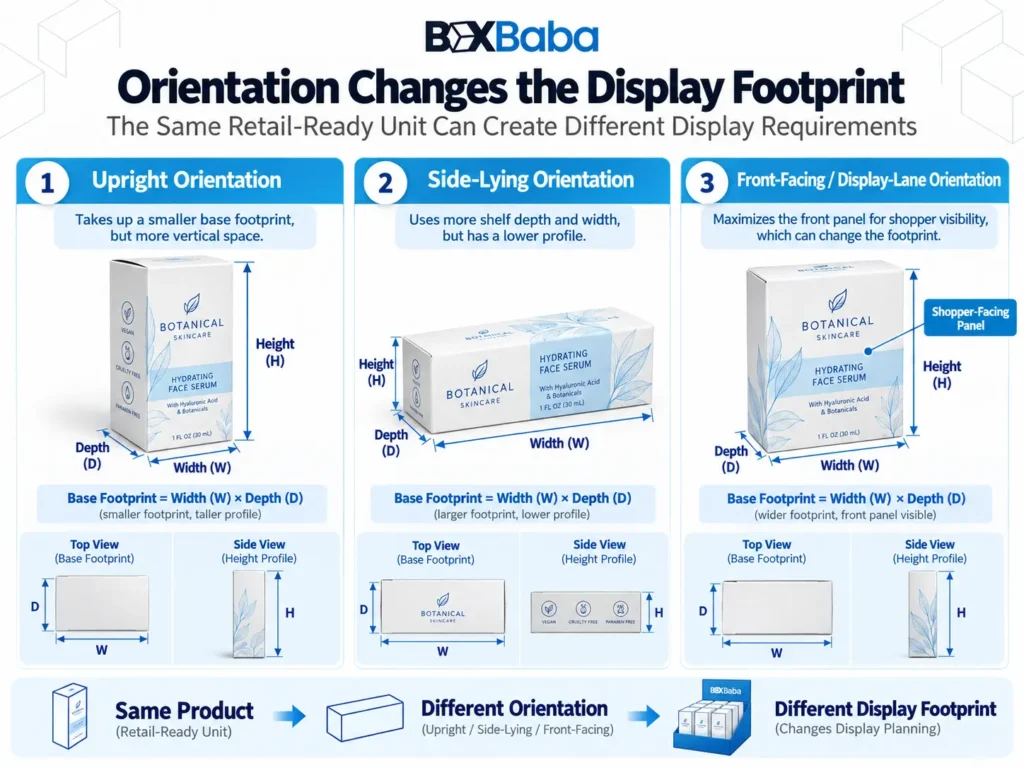
Confirm How the Product Will Sit in the Display
Measurements and orientation should be recorded together.
The same product can create a different footprint depending on whether it sits:
- upright;
- horizontally;
- flat;
- at an angle;
- inside a lane;
- inside an individual holder.
A long narrow product standing vertically uses retail space differently from the same item laid horizontally.
For that reason:
Product Dimensions + Orientation → Usable Display Input
Do not postpone orientation until after a display size has already been assumed.
Identify the Shopper-Facing Side
Dimensions describe the space occupied by the product.
They do not identify which panel or label should face the shopper.
For rectangular cartons, mark the intended front.
For bottles or jars, state whether a particular label should remain oriented toward the shopper.
This information can become important later where:
- round products can rotate;
- several SKUs need clear visual separation;
- a front carton panel must remain visible;
- support geometry could cover part of the product.
DB-03 only records that requirement. The later structural articles determine how the display controls it.
Record the Complete Finished Unit Weight
Dimensions describe product space. Weight provides a separate structural input.
Record the weight of one complete retail-ready unit in the same condition in which it will enter the display.
Do not substitute:
- empty-container weight;
- net contents alone;
- one packaging component.
Use:
Complete Finished Unit Weight
DB-03 does not calculate the final loaded display from this number. It simply establishes the correct input for later structural planning.
This can be especially useful for multi-unit bottle programs such as Supplement Display Boxes, where several finished bottles or cartons may ultimately share one retail structure.
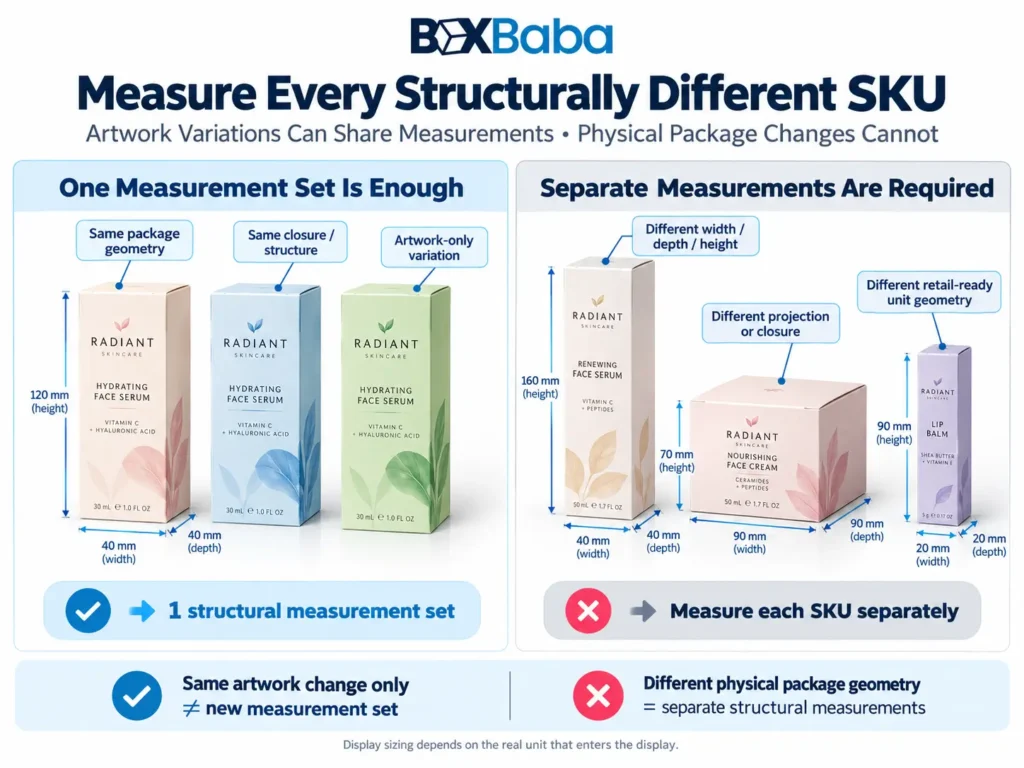
Measure Every Structurally Different SKU
Products belonging to the same collection should not automatically be treated as one physical size.
One SKU may have a:
- taller bottle;
- wider cap;
- deeper carton;
- different pouch gusset;
- alternate closure;
- attached promotional component.
Measure each SKU when its physical retail package differs.
Do not rely only on the largest-looking product. A shorter SKU may still have the widest closure or a different base profile.
A practical handoff can look like this:
SKU / Product | Maximum Profile | Unit Weight | Orientation | Important Feature |
SKU A | ___ | ___ | ___ | ___ |
SKU B | ___ | ___ | ___ | ___ |
SKU C | ___ | ___ | ___ | ___ |
If several SKUs use the same physical package and differ only in artwork, flavor, formula or printed identity, one structural measurement set may be sufficient while the SKU identities remain separately documented.
If the product package changes before a repeat order, recheck the physical measurements before assuming the previously approved display specification still applies. The deeper repeat-order version-control process belongs to a separate Display Boxes guide.
Keep Units and Measurement Labels Consistent
Use one measurement system throughout the specification, such as inches or millimeters.
Always include the unit.
Do not write:
1.5 × 3 × 5
without identifying whether those numbers are inches, centimeters or millimeters.
For rectangular merchandise, record dimensions consistently according to the intended display orientation. For round products, clearly distinguish diameter from total height.
Clarity is more important than forcing every object into one naming convention.
Product Measurement Is Different From Measuring an Existing Box
These are two separate tasks.
Measuring an existing box answers questions such as:
- what are its internal dimensions?
- what are its external dimensions?
- what is its L×W×H?
- what size does it occupy for shipping?
Measuring a product for a new display asks:
What is the maximum physical profile of the finished merchandise the new structure must accommodate?
If you need to measure an existing carton itself, BoxBaba How to Measure a Box Dimension Correctly guide covers internal dimensions, external dimensions and L×W×H in more detail.
For this article, the important distinction remains:
Product Specification ≠ Existing Box Specification
Do Not Add a Universal Clearance to Product Dimensions
Once the product is measured, do not immediately convert those measurements into a guessed display size by adding one arbitrary clearance.
Required space can vary with:
- product geometry;
- orientation;
- adjacent products;
- dividers;
- holders;
- insertion path;
- shopper removal;
- board construction;
- manufacturing requirements.
Use:
Actual Product Measurements → Structural Development → Appropriate Clearance
not:
Product Measurement + Universal Allowance = Display Size
This also keeps DB-03 separate from the next sizing article.
Use Photos, Drawings and Physical References Where They Add Clarity
Measurements communicate scale.
Images communicate shape.
For products with unusual closures, flexible profiles or irregular geometry, useful reference images can include:
- front view;
- side view;
- top view;
- closure;
- base.
A supplier drawing can also help where it accurately represents the current finished product.
For a project where fit or support geometry is especially important, a suitable physical product reference may be useful depending on the development process.
Common Mistakes When Measuring Products for Display Boxes
Measuring the Product Inside Its Retail Carton
If the completed carton enters the display, that carton is the structural measurement reference.
Better: measure the actual retail-ready unit the display will hold.
Using Fill Capacity Instead of External Dimensions
Fill volume does not determine a bottle, jar or tube final outside profile.
Better: measure the complete finished product.
Ignoring the Cap, Pump or Dropper
A closure may be wider or taller than the central body.
Better: find the maximum external profile of the complete closed unit.
Measuring a Flexible Pouch Flat
A filled pack may expand through its contents and gussets.
Better: measure the normal finished filled profile.
Measuring Only One SKU
Products from one line may still use different physical packages.
Better: measure every structurally different SKU.
Forgetting Orientation
The same product can occupy different display space when upright, horizontal or angled.
Better: document orientation with the measurements.
Using Net Contents as Unit Weight
Net contents alone do not represent the complete retail unit.
Better: record the finished packaged unit weight.
Treating Product Dimensions as Display Dimensions
The measured merchandise is only one input to the display.
Better: keep product measurements separate from the later display-sizing process.
Product Measurement Checklist
Before handing product specifications to the display-design stage, confirm:
Finished Unit
- What physically enters the display?
- Is it assembled, closed and filled where relevant?
Maximum Profile
- Maximum width
- Maximum depth
- Maximum height
- Maximum diameter where relevant
- Base footprint where relevant
Closure / Projection
- Cap
- Lid
- Pump
- Dropper
- Bulb
- Collar
- Spout
- Gusset
- Other controlling feature
Weight
- Complete finished unit weight
Orientation
- Upright, horizontal, flat or angled
Shopper-Facing Side
- Which panel or label should face forward?
SKU Variation
- Which SKUs have different physical packages?
References
- Photos, drawings or product samples where useful
This creates a clean measurement handoff before quantity, arrangement, support geometry and final display dimensions are developed.
What Happens After the Product Is Measured?
Once the merchandise is documented, the next process becomes:
Product Measurements → Quantity → SKU Arrangement → Rows / Columns / Lanes → Product Support → Retail Footprint → Display Size → Structure
DB-03 stops at the measurement handoff.
The next article, How to Size a Display Box for Your Products, should own the next question: how those measurements combine with quantity and arrangement to determine the display-sizing requirement.
Do not link that article until its URL is live.
Preparing Product Measurements for BoxBaba
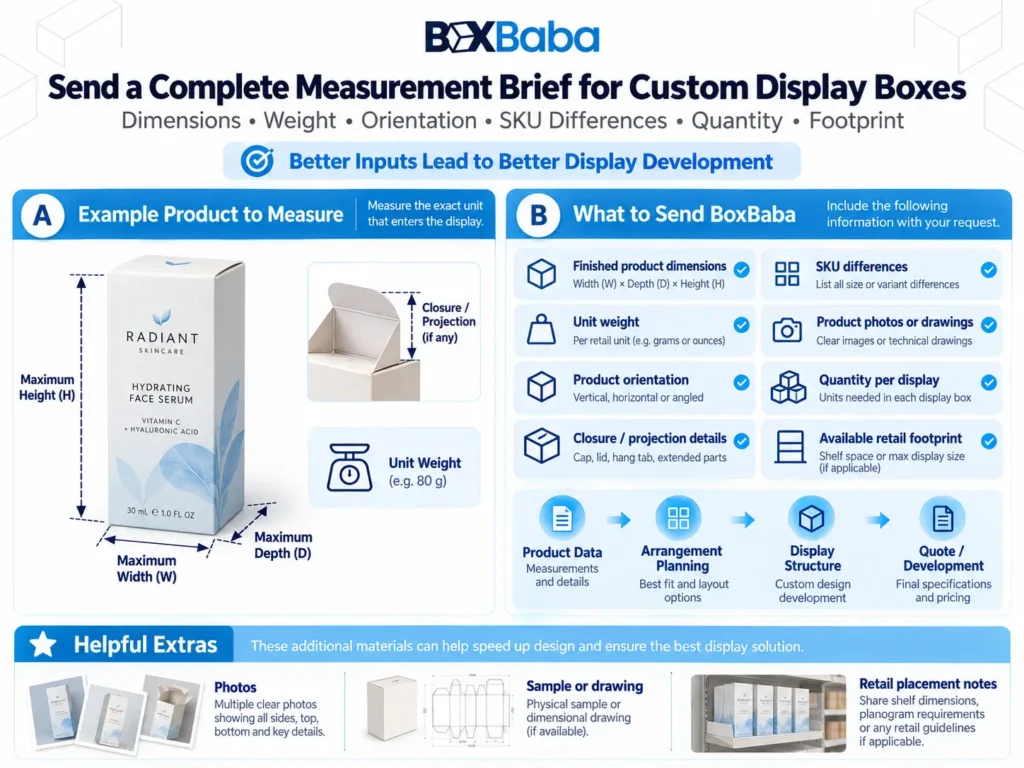
When requesting custom retail-display packaging, provide:
- the finished product or retail package being displayed;
- maximum external dimensions;
- closure or projection details;
- base footprint where relevant;
- complete finished unit weight;
- intended orientation;
- shopper-facing panel;
- measurements for every structurally different SKU;
- photos or drawings where useful.
If already known, also provide the intended quantity per display and available counter or shelf footprint.
These inputs allow the structure to be developed around the real merchandise rather than an assumed stock size.
BoxBaba MOQ starts from 100 units on most product lines. Artwork assistance, dieline support and digital 3D mockups are available during development. Eligible standard projects may have production turnaround starting from 5–9 business days after specifications and artwork are approved, depending on structure, material, quantity, sampling, finishing and other project requirements.
Free USA shipping is available on eligible custom packaging orders.
Once the product measurements are ready, explore BoxBaba Custom Display Boxes to move from product specification into a project-specific display structure.
Frequently Asked Questions
How do I measure a product for a custom display box?
Measure the complete retail-ready unit that will physically enter the display. Record its maximum external width, depth and height—or diameter and height where appropriate—along with important closures, projections, finished unit weight and intended orientation.
Should I measure the product or its individual retail carton?
Measure whichever finished unit physically enters the display. If the product will already be inside a retail carton, measure that carton. If the bottle, tube, pouch or other product enters directly, measure the finished product itself.
Should the cap, pump or dropper be included?
Yes. Include fixed closures and projections that change the product maximum external profile. A cap, pump or dropper may control the widest point or complete closed height.
How should I measure a flexible pouch?
Measure the pouch in its normal finished filled condition. Record the maximum filled width, depth and height, including relevant gusset expansion, closures or fixed projections.
Do I need to measure every SKU?
Measure every structurally different SKU. If several variants use exactly the same physical package and differ only in artwork or product identity, one structural measurement set may be sufficient.
Are product dimensions the same as display dimensions?
No. Product measurements are only inputs. Final display dimensions also depend on quantity, arrangement, support, access, retail footprint and structural development.
What should I send BoxBaba with the measurements?
Send the finished dimensions, unit weight, orientation, important closure or projection details, SKU differences and photos or drawings where useful. If known, also include the intended quantity per display and available retail footprint.