
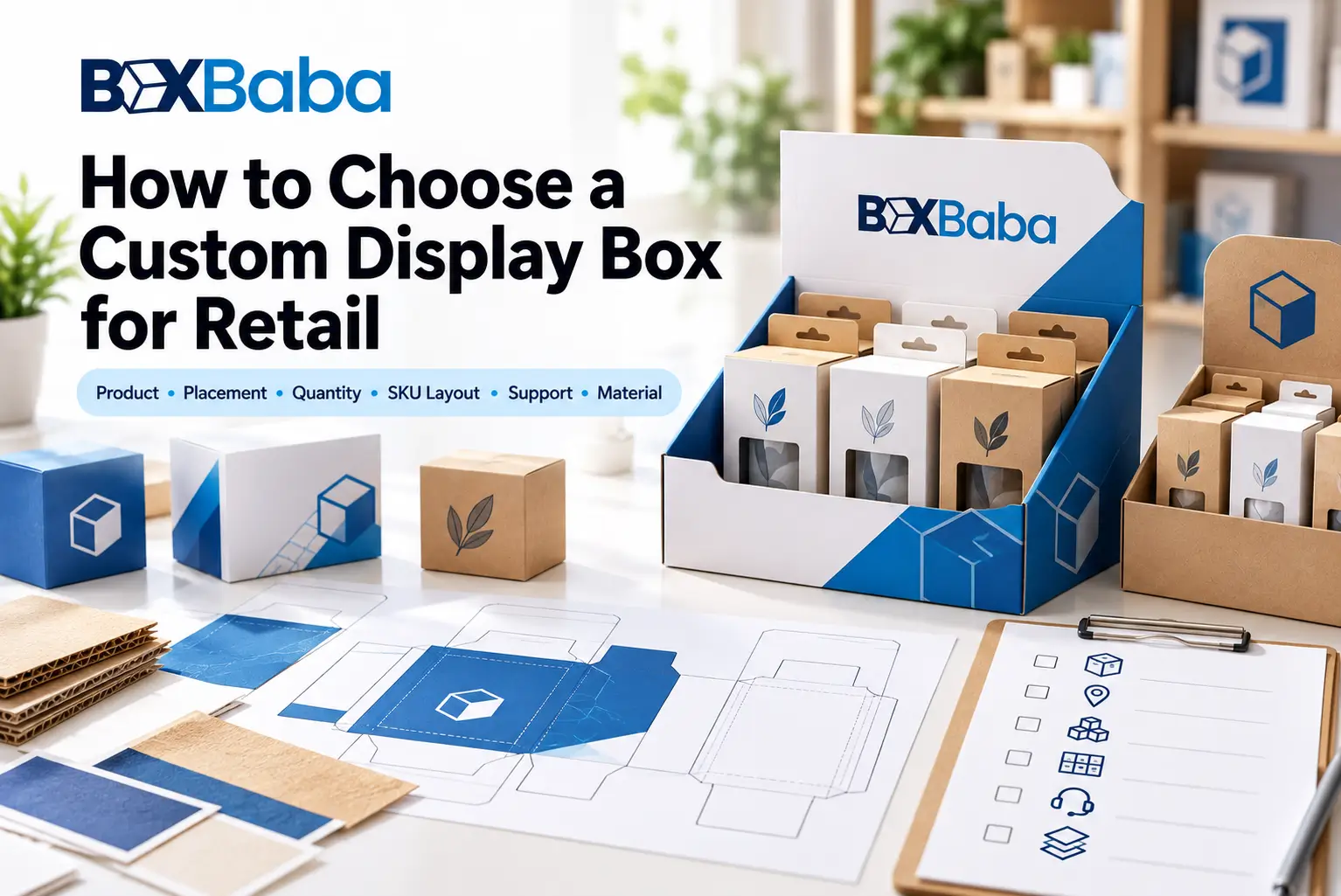
Choosing a custom display box should start with the finished retail product and the space where it will be merchandised—not with a box style selected from a catalog.
The same products can require different displays depending on the available counter or shelf space, quantity, SKU arrangement, complete loaded weight, shopper access and whether the merchandise needs an open tray, dividers, individual holders or tiers.
A practical selection sequence is:
Finished Retail Product → Placement → Product Dimensions → Quantity → SKU Arrangement → Product Support → Loaded Configuration → Retail Footprint → Display Structure → Material → Dieline
This guide explains how those decisions connect so you can identify the right display direction before moving into detailed measurement, sizing and structural development.
If you are already ready to compare commercial structures, Custom Display Boxes provides the main BoxBaba display-packaging category.
Start With the Finished Product That Will Enter the Display
The first question is not:
What display style do you want?
It is:
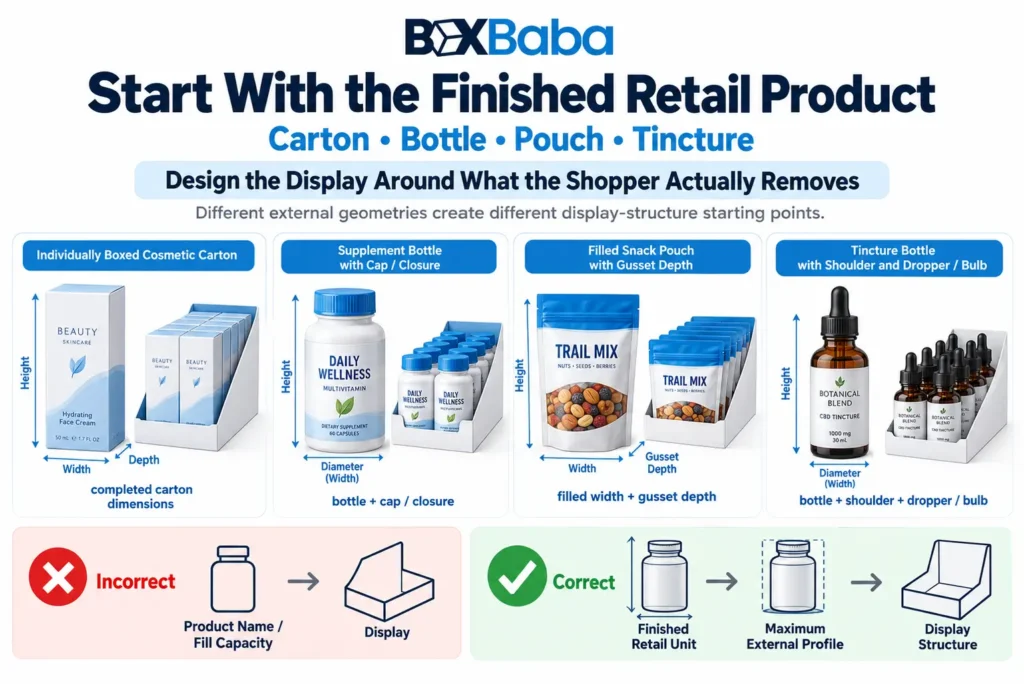
What finished retail unit will physically sit inside the display?
That may be an individually boxed cosmetic, supplement bottle, snack pouch, lip balm tube, medicine carton, tincture bottle, packaged pen or another finished retail package.
This distinction matters because the display should be planned around the unit the shopper actually removes.
Use:
Finished Retail Unit → Display
rather than:
Product Ingredient / Fill Capacity / Product Name → Display
Two bottles with the same fill capacity can use different external dimensions, shoulders and closures. Two flexible packs containing similar quantities can use different filled depths or gussets.
The finished retail-ready package should therefore be the structural reference.
Define Where the Display Will Be Used
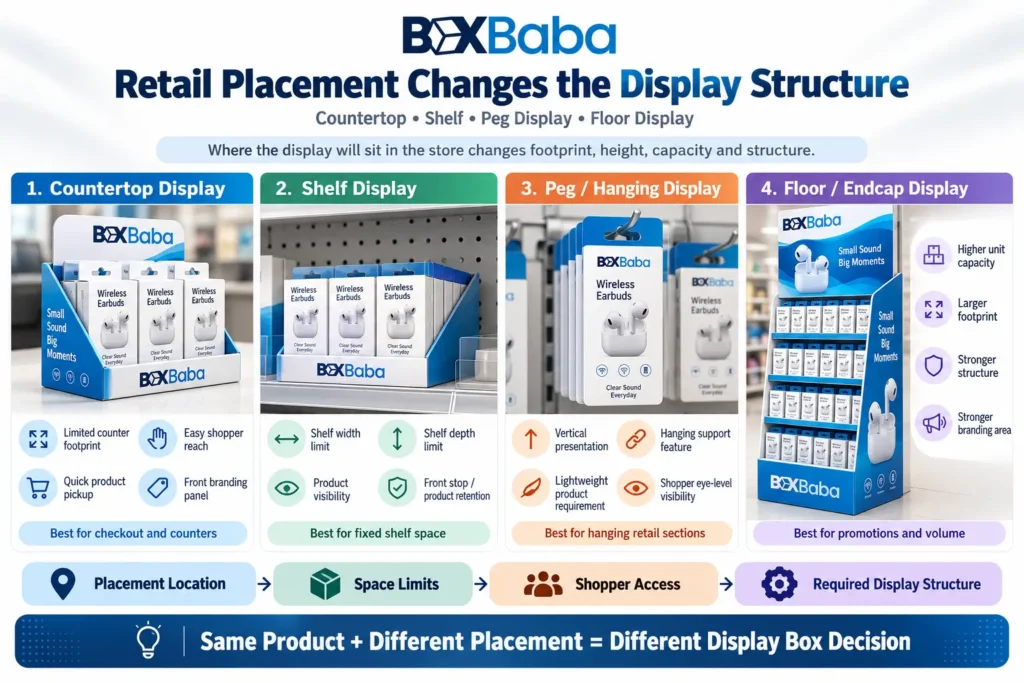
Placement establishes the physical space available to the merchandise.
Confirm whether the display will sit on a:
- checkout counter;
- retail counter;
- shelf;
- promotional table;
- shelf-ready merchandising area;
- retailer-specified fixture;
- other approved retail surface.
Then identify relevant space constraints such as maximum width, depth, height and vertical clearance.
A display that holds all the required products can still be unsuitable if it does not fit its intended retail location.
When Counter Footprint Leads the Decision
If the project begins with a defined countertop area, use:
Available Counter Footprint → Finished Products → Quantity → Arrangement → Display Structure
Counter Display Boxes provide the deeper placement-led commercial direction.
When Broader In-Store Merchandising Leads the Decision
Where the project is driven more by product facings, shopper access, replenishment and wider in-store presentation, Retail Display Boxes provide the broader merchandising direction.
Placement should guide structure selection without becoming the only structural input.
Collect the Basic Product Inputs Before Selecting a Display Style
Before choosing capacity or structure, record the basic external profile of the finished product.
At the selection stage, useful inputs include:
- maximum finished width;
- maximum depth;
- maximum height;
- diameter where relevant;
- finished unit weight;
- significant cap, closure or projection;
- intended facing direction.
For individually boxed products, use the completed individual carton.
For bottles, jars or tubes that enter the display directly, include the fitted cap, pump, applicator or other external projection.
For flexible packaging, consider the finished filled profile rather than relying only on flat-film dimensions.
The detailed measurement procedure belongs to the product-measurement stage. At this point, the important principle is:
Choose the display around the finished retail unit, not nominal product capacity alone.
Quantity Does Not Determine Display Size by Itself
Product count is only one input.
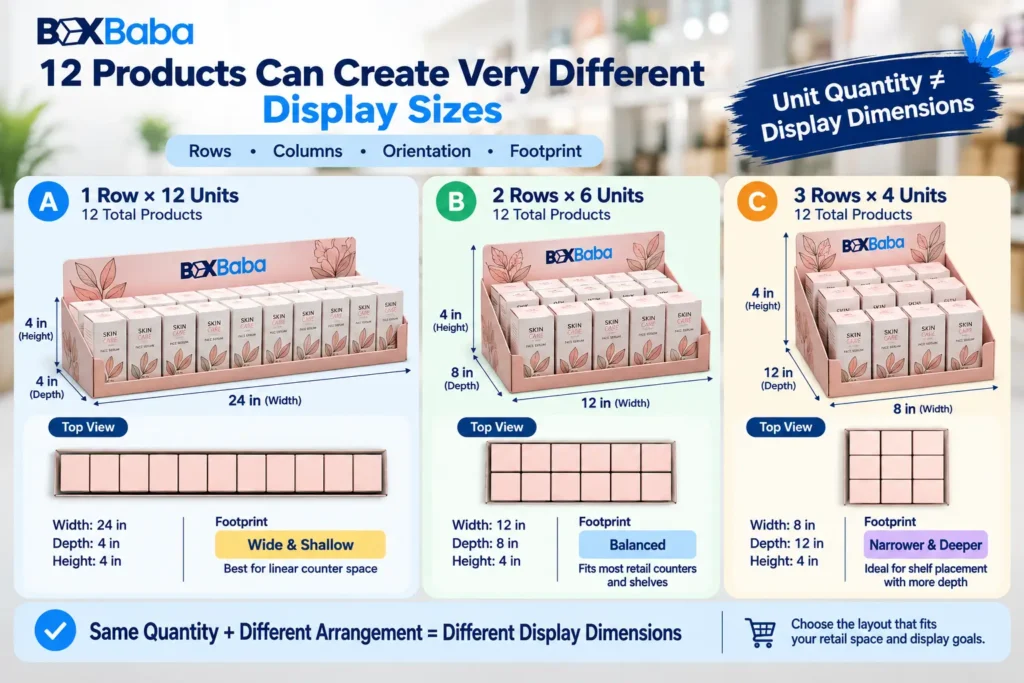
As an illustrative example, 12 identical retail units could potentially be arranged as:
1 row × 12 units
2 rows × 6 units
3 rows × 4 units
Each arrangement creates a different width and depth relationship.
Therefore:
Unit Quantity ≠ Display Dimensions
Quantity should be considered together with product orientation, rows, columns, spacing, SKU allocation and available footprint.
The detailed calculation of final display dimensions should happen only after the intended arrangement is established.
Identify Whether One SKU or Several Will Share the Display
Single-SKU and multi-SKU displays can require different planning.
For a repeated single SKU, the structure may use one product profile, lane width or holder position throughout.
For multiple SKUs, confirm:
- number of SKUs;
- units per SKU;
- whether finished package dimensions differ;
- whether separate lanes or positions are required;
- whether some packages require different support.
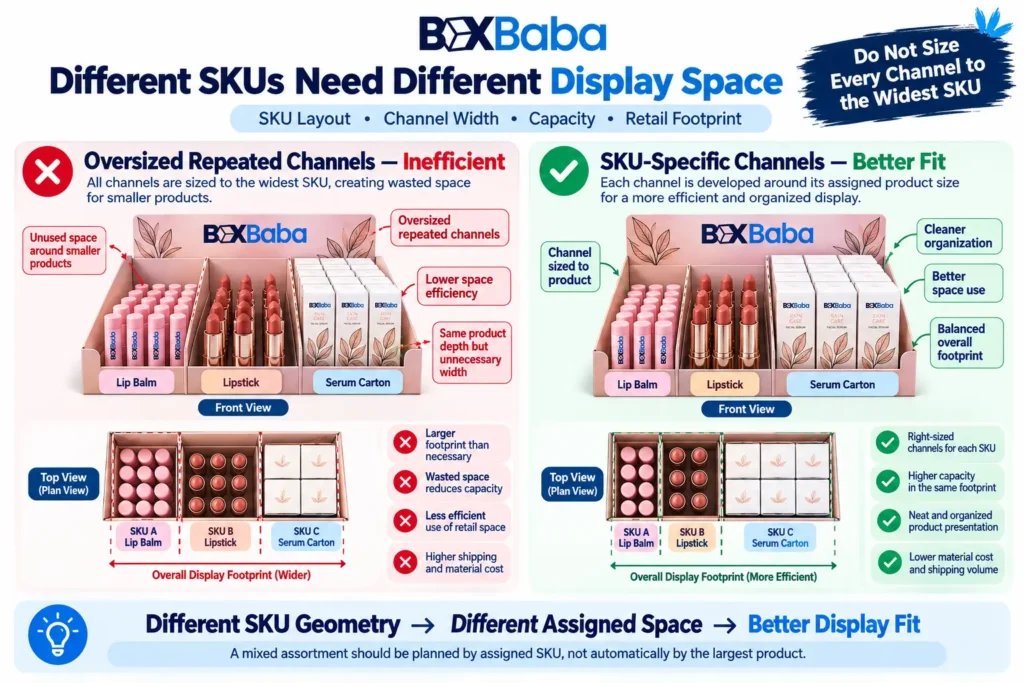
Products from the same brand or formula family should not automatically be assumed to use identical external packaging.
Where physical package dimensions differ materially, the display may need separate zones, lanes or holders.
The complete engineering of a multi-SKU display should follow after the physical compatibility of the packages is confirmed.
Decide How the Products Need to Be Supported
Some products can stand effectively in a simple tray. Others need separation, defined positions or additional height.
The main support directions include:
Open Tray
Suitable where compatible finished packages already remain stable and accessible without individual positioning.
Dividers or Product Lanes
Useful where SKUs need separation or narrow products require lateral organization.
Individual Product Holders
Useful where bottles, tubes or other merchandise need defined locations or controlled spacing.
Holder geometry should follow the actual finished product, insertion path and intended support point rather than one nominal product dimension.
Tiers or Raised Platforms
Useful where rear merchandise would otherwise be obscured by products in front.
The selection question is:
Does the merchandise require support, separation or elevation to remain usable and organized in the intended retail arrangement?
A more complex structure should only be chosen where it solves a real merchandising requirement.
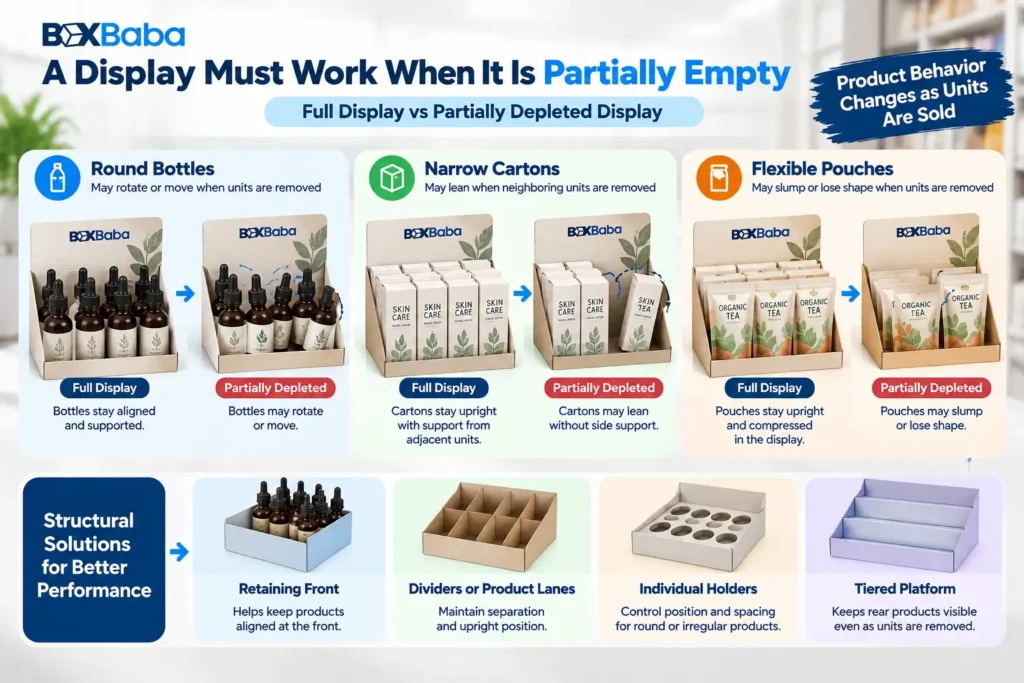
Consider the Display After Products Are Removed
Retail displays change during the selling cycle.
When every position is occupied, neighboring products may help maintain alignment. As units are removed, remaining merchandise can behave differently.
Depending on the package:
- round bottles may rotate;
- narrow cartons may lean;
- flexible packs may slump;
- products in oversized lanes may shift.
This means the structure should be considered both:
Fully Loaded
and:
Partially Depleted
Where consistent product positioning matters, a controlled lane, retaining feature, divider or individual holder may become more useful.
The detailed engineering of partially empty behavior can be evaluated separately, but it should be considered during initial display selection.
Review the Loaded Configuration Before Choosing Material
Material selection should follow the complete merchandise arrangement.
A useful planning relationship is:
Finished Unit Weight × Unit Quantity + Holder / Divider Components → Loaded Configuration
The resulting load can influence the base, side walls, holder platform, tier structure and material direction.
There is no universal quantity at which one material automatically becomes correct.
A display carrying several filled glass bottles can require different structural decisions from a display holding the same number of lightweight cartons.
Use the actual loaded arrangement rather than choosing material from product category alone.
Choose the Display Structure From the Dominant Requirement
Several display styles can use similar trays, headers, dividers or holders. The correct starting point is the requirement that dominates the project.
Dominant Requirement | Starting Direction | Main Planning Question |
Limited counter footprint | Counter Display Boxes | How much merchandise must fit inside the available counter space? |
Retail-ready product arrangement | PDQ Trays and Boxes | How should the merchandise arrive and be positioned for retail use? |
Product-led merchandising | Product Display Box | What arrangement best suits the finished products? |
Broader in-store merchandising | Retail Display Boxes | How should the products be presented, accessed and replenished? |
Permanent custom-cut positioning | Die Cut Display Boxes | Does the product need defined cut openings, positions or access geometry? |
Solid-paperboard-led structure | Cardboard Display Boxes | Does the approved compact arrangement suit a paperboard display? |
Fluted-board-led structure | Corrugated Display Boxes | Does the approved display require a corrugated structural direction? |
The same finished structure can contain several design features, so choose the commercial display family according to the dominant merchandising or structural requirement rather than one visual feature.
Choose Material After the Display Arrangement Is Understood
Material should follow the finished products, complete loaded configuration, footprint and selected structure.
Paperboard / Cardstock Direction
Paperboard can suit compatible compact displays where the approved merchandise arrangement and structural geometry support it.
Cardboard Display Boxes provide the deeper paperboard-led commercial direction.
Corrugated Direction
Corrugated board can be considered where the approved display benefits from fluted-board construction because of its structure, footprint or loaded configuration.
Corrugated Display Boxes provide the deeper fluted-board-led commercial direction.
Do not use rules such as:
supplement = corrugated
or:
snack = paperboard
Instead use:
Product + Quantity + Loaded Configuration + Footprint + Structure → Material Direction
The detailed cardboard-versus-corrugated comparison should be made only after these inputs are known.
Check Shopper Access and Replenishment
A display should allow one product to be removed without unnecessarily disturbing neighboring merchandise.
Depending on the structure, access can be affected by:
- front-wall height;
- holder depth;
- spacing;
- lane width;
- divider height;
- exposed product height.
Also consider how retail staff will refill the display.
Shopper removal and staff replenishment are related but are not always the same action.
A structure that looks efficient when fully loaded can still be inconvenient if staff cannot replenish it practically.
At the selection stage, simply confirm:
How does the shopper remove a product?
and:
How does retail staff refill the display?
The detailed replenishment workflow can be developed later.
Decide Whether a Header or Tier Solves a Real Requirement
Headers provide extra printable space above the merchandise, while tiers can improve rear-row visibility.
Before adding either feature, check:
- product height;
- available vertical clearance;
- shopper visibility;
- retail footprint;
- loaded structure.
A header or tier should solve a defined branding, visibility or merchandising problem rather than being added only because the structure permits it.
Keep the Display Separate From the Product Primary Packaging Function
A display can hold products that are already individually packaged:
Product → Individual Retail Package → Display
or it can hold retail-ready bottles, tubes, cartons or packs directly.
The display should follow whichever finished unit physically enters it.
A standard display structure should also not automatically be treated as providing:
- liquid containment;
- moisture-barrier performance;
- food-contact suitability;
- child-resistant performance;
- tamper resistance;
- light-barrier protection.
Those functions belong to the applicable product-packaging system and should be specified and verified separately where required.
Retail Display and Shipping Packaging Are Different Functions
Retail displays are planned primarily around merchandising, access and presentation.
Shipping packaging is planned around distribution and handling.
Some retail-ready systems connect those functions, but a display should not automatically be assumed to perform as a shipping carton.
If merchandise will travel already loaded inside the display, that shipping and setup workflow should be identified before the final structure is approved.
A dedicated retail-ready packaging guide can address that relationship in greater depth.
Finalize the Structure Before Final Artwork
Artwork should follow the approved display structure.
Use:
Product Arrangement → Display Structure → Material → Dieline → Artwork → Proof → Approval
Cuts, folds, holder openings, retaining walls, headers and other structural elements can affect available artwork areas.
BoxBaba general Dieline in Packaging guide explains cut lines, folds, safe areas, bleed and other dieline fundamentals in greater depth.
For DB-01, the important selection rule is simple:
Approve the structural direction before building final display artwork around it.
When a Custom Display Box May Not Be Necessary
A custom multi-unit display is not always required.
Another retail solution may be more appropriate where:
- products already merchandise effectively in existing fixtures;
- individual packages already stand securely without a tray;
- products are primarily designed for peg-hook merchandising;
- the project needs only individual secondary packaging;
- the available retail space does not support an additional display structure;
- the retailer specifies another merchandising system.
The goal is not to choose the most complicated display.
It is to choose the simplest compatible structure that satisfies the product and retail requirements.
Common Mistakes When Choosing Display Boxes
Choosing a Style Before Understanding the Finished Product
A structure selected too early may need redesign once the actual package dimensions or projections are known.
Better approach: establish the finished retail-unit profile first.
Sizing From Quantity Alone
A product count does not define the arrangement or footprint.
Better approach: combine quantity with rows, columns, SKU allocation and available retail space.
Ignoring Loaded Weight
An empty display does not represent its final loaded configuration.
Better approach: include finished unit weight and quantity before selecting structure and material.
Assuming Every SKU Uses the Same Package
Products with similar branding can still have different physical dimensions.
Better approach: identify every structurally different SKU.
Ignoring Product Removal
A tightly packed layout may save footprint but make merchandise difficult to select.
Better approach: define the shopper-access direction before structural approval.
Evaluating Only the Fully Loaded Display
Products can rotate, lean or shift as units are sold.
Better approach: consider how the structure behaves when partially depleted.
Choosing Material Before Structure
Material cannot be selected reliably from product category alone.
Better approach: establish the merchandise arrangement and loaded configuration first.
Finalizing Artwork Too Early
Changes to the structure can move folds, cuts, holders and printable areas.
Better approach: approve the structural dieline before final artwork placement.
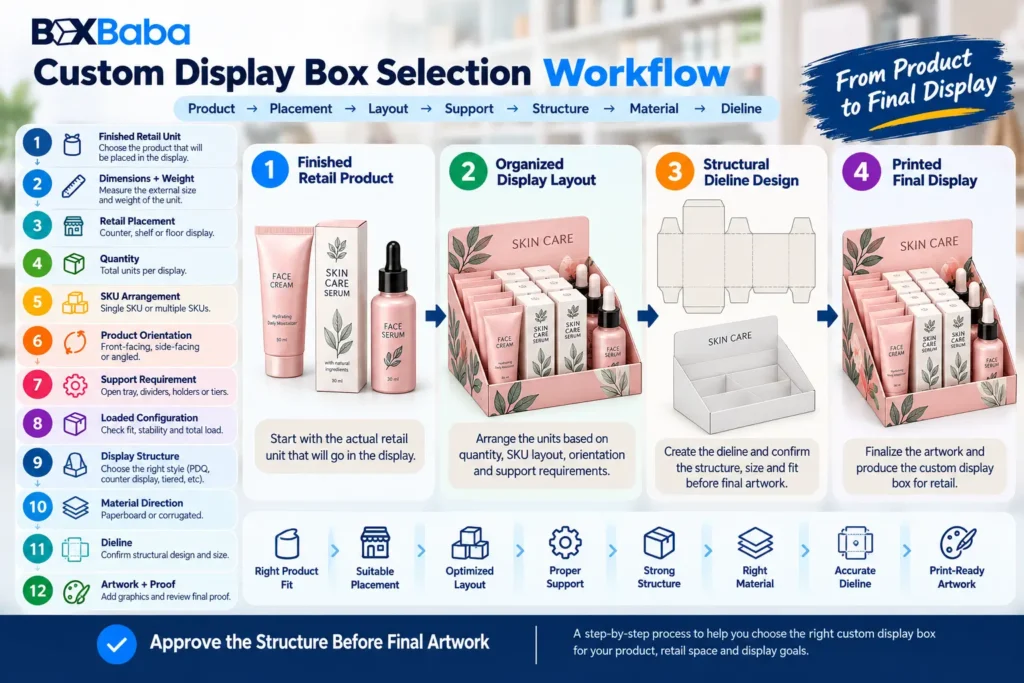
A Practical Display Box Selection Workflow
Use this sequence when preparing a display project:
1. Identify the Finished Retail Unit
Confirm what physically enters the display.
2. Collect the Product Dimensions and Weight
Establish the maximum finished profile and unit weight.
3. Confirm Retail Placement
Define the counter, shelf or fixture constraints.
4. Set Quantity
Confirm the number of units needed in each display.
5. Define the SKU Arrangement
Identify how many products or variants share the structure.
6. Choose Product Orientation
Decide how the merchandise faces the shopper.
7. Determine the Support Requirement
Evaluate whether a tray, lane, divider, holder, retaining feature or tier is needed.
8. Review the Loaded Configuration
Consider the finished merchandise rather than the empty display alone.
9. Select the Display Structure
Choose according to the dominant product and retail requirement.
10. Select the Material Direction
Evaluate the structure against the approved loaded configuration.
11. Develop the Dieline
Build the structural drawing around the approved arrangement.
12. Add Artwork and Review the Proof
Apply final branding after the structural geometry is established.
The process can be summarized as:
Finished Product → Placement → Dimensions → Quantity → SKU Layout → Support → Loaded Configuration → Footprint → Structure → Material → Dieline → Artwork → Proof
What Information Should You Prepare Before Requesting a Display Box Quote?
Prepare:
- finished retail product type;
- whether it enters the display bare or individually boxed;
- maximum product dimensions;
- finished unit weight;
- quantity per display;
- number of SKUs;
- units per SKU;
- preferred arrangement where known;
- product orientation;
- shopper-facing panel;
- available retail footprint;
- height or clearance restrictions;
- holder/divider requirement where known;
- header requirement;
- material preference, if any;
- artwork status;
- finishing requirements;
- total order quantity;
- shipping destination.
For an unusual package shape, dimensional drawings, photographs or a suitable product reference can also help communicate the project.
These inputs give the structural planning process a stronger starting point than one assumed display size.
Choosing Display Boxes With BoxBaba
BoxBaba develops custom display packaging around the finished retail products, quantity, SKU arrangement, loaded configuration, available retail footprint and intended merchandising structure.
MOQ starts from 100 units on most product lines.
Artwork assistance, dieline support and digital 3D mockups are available during development. Eligible standard projects may have production turnaround starting from 5–9 business days after specifications and artwork are approved, depending on the structure, material, quantity, sampling, finishing and other project requirements.
Free USA shipping is available on eligible custom packaging orders.
Once you have identified the finished product dimensions, weight, display quantity, SKU arrangement and retail footprint, Custom Display Boxes provide the next commercial step for comparing structures and requesting a project-specific quote.
Frequently Asked Questions
What should I consider when choosing a display box?
Start with the finished retail product, intended placement, product dimensions, unit quantity, SKU arrangement, loaded configuration, shopper access and available footprint. Use those inputs to select the structure and then evaluate material.
Should I choose the display style or material first?
Establish the merchandise arrangement and structural requirements first. Material selection should follow the products, loaded configuration, footprint and chosen display structure rather than being selected only from appearance.
How many products should a display box hold?
There is no universal capacity. The practical unit count depends on the finished product dimensions, desired arrangement, rows and columns, number of SKUs, shopper access and available retail footprint.
Can several SKUs share one display?
Yes, where their physical packages and intended arrangement are compatible. Products with materially different external dimensions may require separate lanes, zones or holder geometry.
Do all display boxes need dividers or holders?
No. Compatible products may work in a simple open tray. Dividers, lanes or holders are useful where merchandise needs separation, defined positions or additional support.
Should artwork be finalized before the display dieline?
No. Final artwork placement should follow the approved structural dieline because folds, cuts, holders, headers and retaining panels can affect printable areas.
What information should I send when requesting a custom display quote?
Provide the finished product dimensions, unit weight, quantity per display, number of SKUs, intended arrangement, available retail footprint, support requirements, artwork status, material preference where known, total order quantity and shipping destination.