
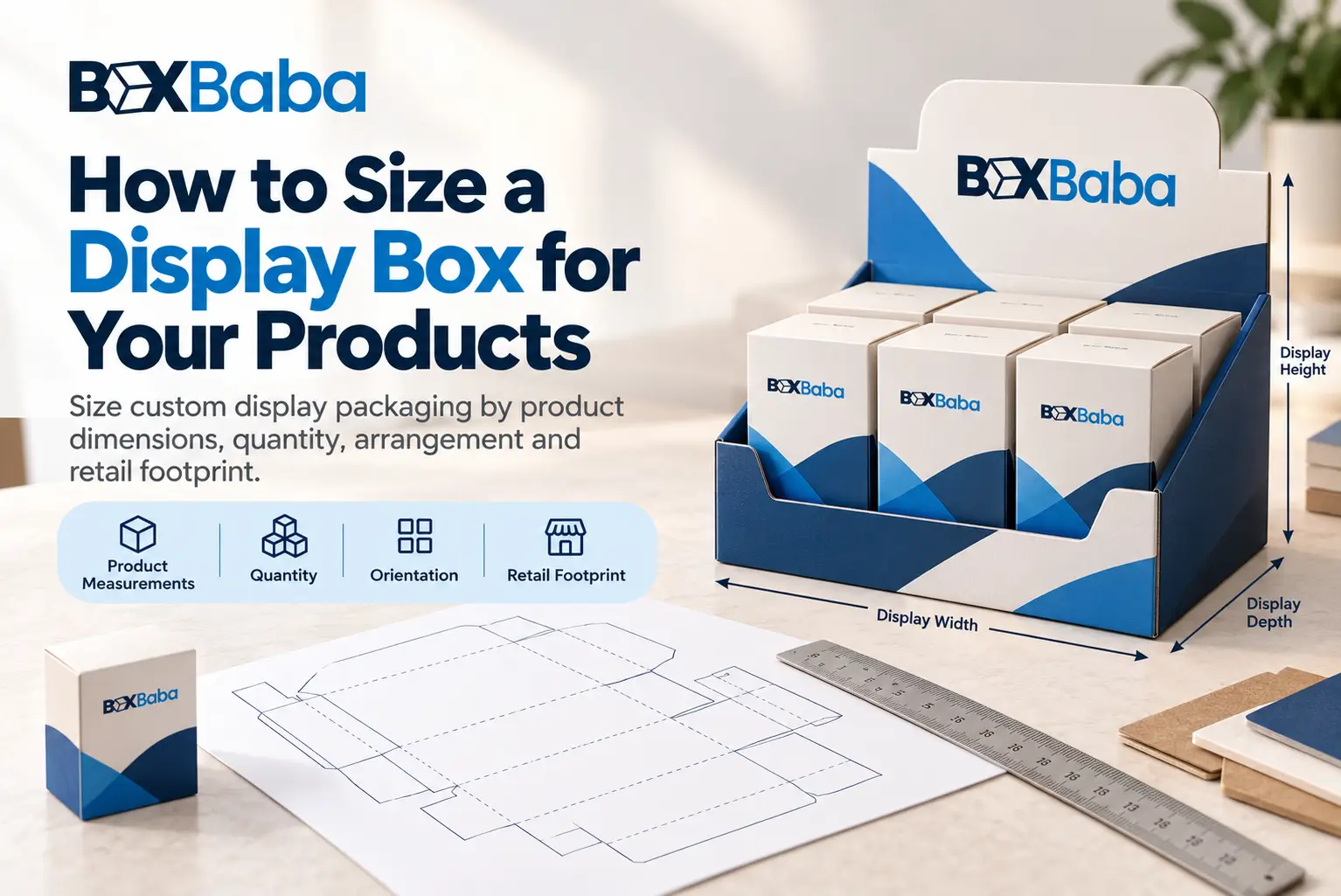
A custom display box should be sized from the finished products, quantity, arrangement and available retail space rather than selected from a universal size chart.
Start with verified measurements of the retail-ready merchandise. Then determine how many units need to fit, which side faces the shopper, how those units are arranged and whether the merchandise needs lanes, dividers or individual support.
A useful sizing sequence is:
Product Measurements → Quantity → Orientation → SKU Arrangement → Merchandise Footprint → Support Requirement → Shopper Access → Retail Footprint → Display Structure → Dieline → Final Dimensions
The important distinction is that product measurements and arrangement create the sizing requirement; they do not automatically equal the finished display dimensions.
For project-specific structures developed around actual merchandise, explore BoxBaba Custom Display Boxes.
Start With Verified Product Measurements
Display sizing begins after the finished retail unit has been measured.
Use the dimensions of whatever physically enters the display:
Finished Product → Display
or:
Finished Product → Individual Retail Carton → Display
If a bottle will already be packed inside an individual carton, use the finished carton dimensions. If the bottle enters the display directly, use the complete bottle profile, including any closure or projection that controls its maximum size.
The sizing brief should already identify the finished product’s maximum width, depth and height—or diameter where relevant—along with unit weight and intended orientation.
The separate How to Measure Products for Custom Display Boxes guide should remain the deeper measurement resource once that article is live. DB-04 starts after those product measurements have been established.
Quantity Alone Does Not Determine Display Size
Product count tells you how many units must fit. It does not tell you how much counter or shelf space they will occupy.
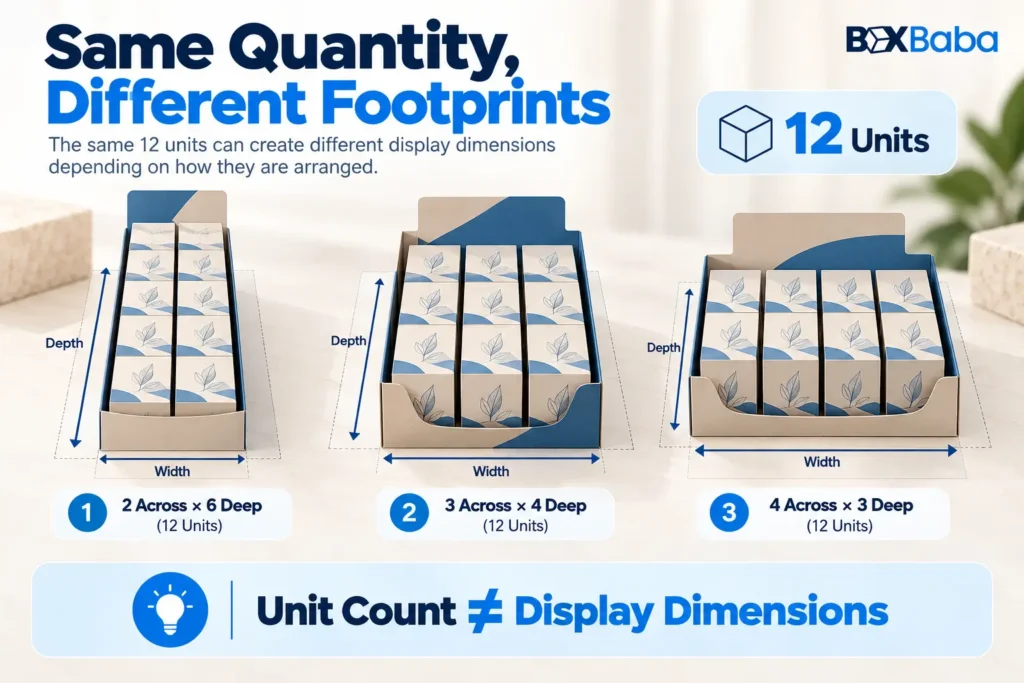
As an illustrative example, 12 identical products could potentially be arranged as:
2 across × 6 deep
3 across × 4 deep
4 across × 3 deep
Each layout contains 12 units but creates a different width-to-depth relationship.
Therefore:
Unit Count ≠ Display Dimensions
The quantity has to be combined with product orientation and arrangement before a useful display footprint can be established.
Product Orientation Changes the Display Footprint
For a rectangular retail package, assume its finished measurements are recorded as:
Width × Depth × Height
If its front panel faces the shopper, the product width generally contributes to the display width while its depth contributes to the front-to-back arrangement.
Rotate the package and those relationships can change.
Therefore:
Same Product + Different Orientation → Different Merchandise Footprint
For cylindrical merchandise, diameter may influence both width and depth, but an asymmetrical closure or wider projection can still affect spacing.
Choose the intended orientation before laying out rows and columns.
Calculate the Merchandise Footprint First
For identical rectangular products using the same orientation, a useful conceptual calculation is:
Product Width × Units Across = Product-Only Width
and:
Product Depth × Rows Deep = Product-Only Depth
This establishes the merchandise footprint.
It does not yet include structural allowances such as walls, dividers, holders, folds or shopper-access requirements.
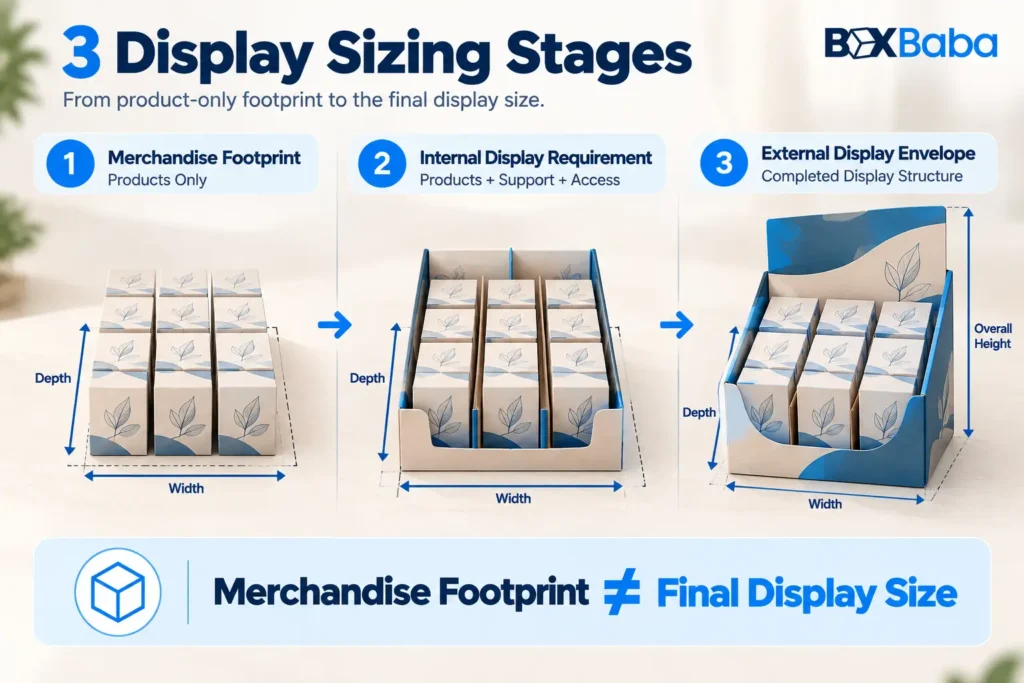
The distinction matters because there are really three different sizing stages.
1. Merchandise Footprint
The physical area occupied by the arranged products alone.
2. Internal Display Requirement
The merchandise footprint plus the space required for approved dividers, holders, lanes, separation and practical product access.
3. External Display Envelope
The completed display width, depth and overall height after its walls, folds, header, tiers or other structural features are included.
Therefore:
Merchandise Footprint ≠ Internal Display Requirement ≠ Final External Display Size
The final production dimensions should come from the approved structure and dieline.
Retail Footprint Can Reverse the Sizing Process
Sometimes the retail space is known before the desired display size.
For example, a retailer may specify the maximum counter width and depth available for a display.
The process can then work backwards:
Available Retail Footprint → Product Dimensions → Possible Arrangement → Practical Quantity → Display Structure
This is especially relevant to Counter Display Boxes because a fixed checkout or countertop footprint may limit how many products can sit across or how deep the display can extend.
For broader shelf, fixture, facings and in-store merchandising requirements, Retail Display Boxes provide the wider retail-placement context.
If the desired quantity and available footprint conflict, the answer may be to change the arrangement or quantity per display rather than compressing the products into an impractical structure.
Single-SKU and Multi-SKU Displays Size Differently
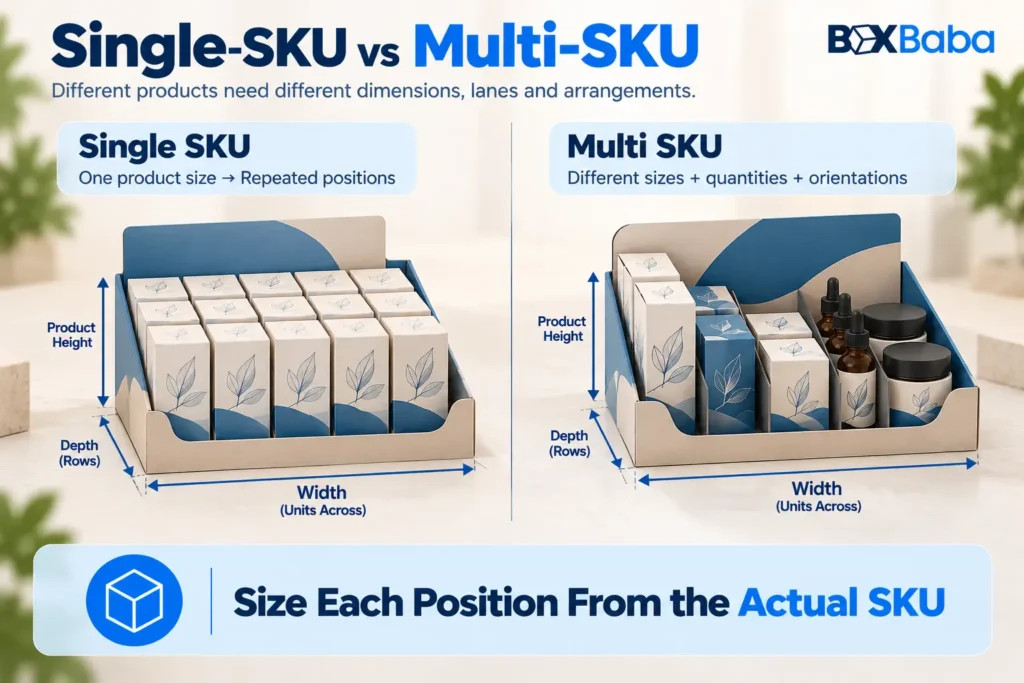
A single-SKU display repeats one main product profile, making the initial arrangement relatively straightforward:
One Product Size → Repeated Positions → Quantity → Merchandise Footprint
A multi-SKU display may contain products with different widths, depths, heights or closures.
For each structurally different SKU, identify its:
- dimensions;
- quantity;
- orientation;
- intended lane, row or zone.
The sizing relationship then becomes:
SKU A Footprint + SKU B Footprint + SKU C Footprint + Required Separation → Merchandise Layout
Do not automatically size every position from only the largest-looking SKU. A smaller product may still have a wider closure, deeper carton or different orientation.
The detailed relationship between assortment design and final dimensions belongs to the later How SKU Arrangement Changes Display Box Size guide.
Account for Dividers, Product Lanes and Holders
Product support occupies space.
A display that uses a simple open tray will not necessarily require the same internal dimensions as one using dividers or individual holder positions for the same merchandise.
With dividers or lanes, the sizing relationship becomes:
Product Positions + Approved Separation Geometry → Internal Display Requirement
Individual holders introduce another relationship:
Product Position + Holder Geometry → Required Internal Area
The holder can depend on the product base, body profile, insertion path and intended support point.
When the merchandise itself drives the support layout, BoxBaba Product Display Box provides the relevant product-led commercial context. If custom-cut openings are a defining part of the structure, Die Cut Display Boxes provide the corresponding geometry-led option.
Do not add a guessed universal allowance for these components. The actual spacing should follow the approved structure.
Do Not Add One Universal Clearance Around Every Product
A conventional tuck carton can work for
A fixed allowance such as:
Product Width + One Standard Clearance
is not a reliable custom-display sizing formula.
Required space can change with:
- product geometry;
- orientation;
- rigid or flexible packaging;
- dividers;
- holders;
- insertion path;
- removal access;
- board construction;
- manufacturing requirements.
Use:
Actual Product Size → Approved Arrangement → Support Geometry → Required Clearance
rather than applying one universal number across every display project.
This avoids turning a preliminary calculation into a false production specification.
many products, but the bottom should receive additional review when the completed product is:
- relatively heavy;
- made from substantial glass;
- tall with a narrow base;
- part of a multi-product configuration.
That does not automatically mean the carton needs auto-lock.
It means the base requirement needs to be evaluated separately.
Possible directions include:
- snap-lock;
- auto-lock;
- reinforced folding construction;
- another appropriate base.
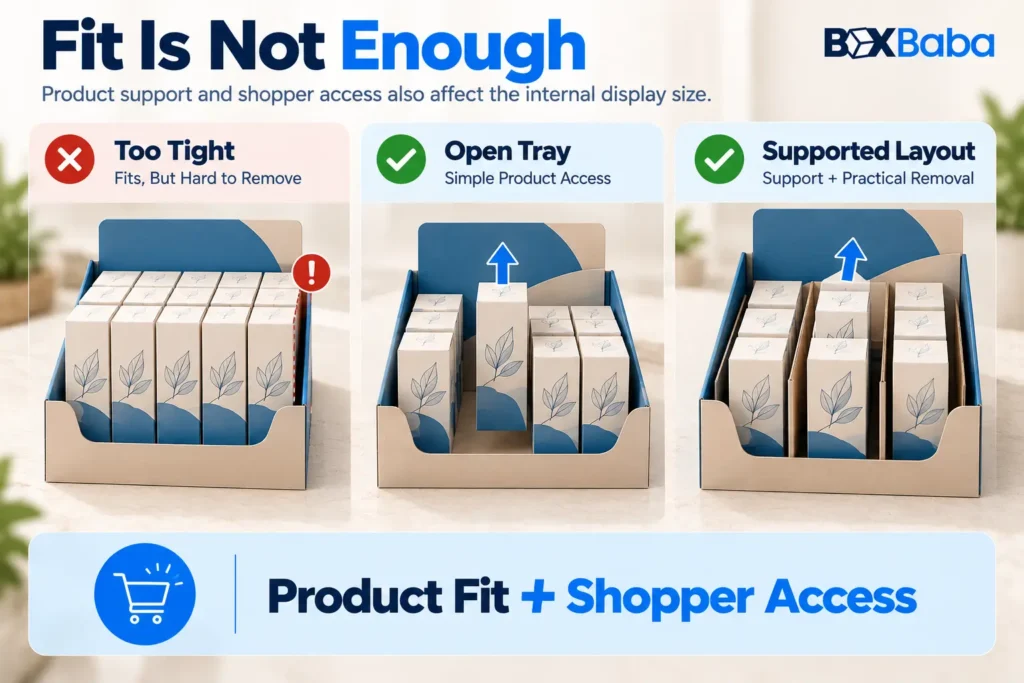
Leave Enough Space for Product Access
A display is not correctly sized simply because every product fits inside it.
Shoppers must also be able to remove products practically.
The access direction may be:
- upward;
- forward;
- through an open tray;
- from a product lane;
- from an individual holder;
- from a tier.
For example, a high front retaining wall can help keep products in position but may make them difficult to grip if too much of the package sits behind it.
Similarly, closely spaced bottles may fit mathematically while leaving too little practical hand access.
The sizing requirement should therefore consider:
Product Fit + Shopper Access
Also consider how the display will be replenished. At this stage, the goal is simply to confirm that the intended arrangement does not prevent practical restocking; the full replenishment workflow belongs to a later dedicated guide.
Fit the Completed Display Within the Retail Space
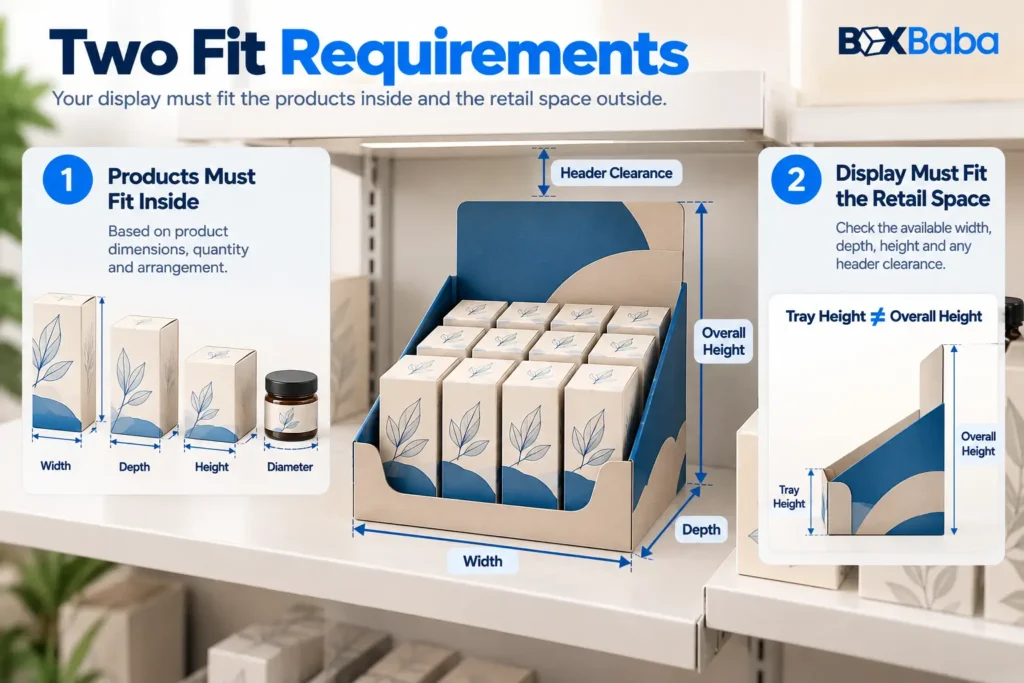
Once the internal merchandise arrangement has been established, check it against the location where the completed display will sit.
Relevant limits can include:
- maximum width;
- maximum depth;
- maximum overall height;
- shelf clearance;
- header clearance;
- retailer fixture restrictions.
The display has to satisfy both conditions:
The Products Must Fit Inside
and:
The Completed Display Must Fit the Retail Location
If those two requirements conflict, adjust the quantity, orientation, number of rows, SKU allocation or structural direction instead of simply removing necessary fit or access space.
Internal and External Display Dimensions Serve Different Purposes
The preliminary internal requirement is developed around the merchandise and its support system.
The final external dimensions also reflect the physical structure itself.
Depending on the design, this may include:
- board thickness;
- folded walls;
- retaining panels;
- structural tabs;
- back panels;
- headers;
- holders;
- tiers.
That is why:
Merchandise Footprint ≠ Final External Dimensions
The final production dimensions should be confirmed through the approved dieline.
For the separate task of measuring an existing box and understanding general internal versus external L×W×H, see BoxBaba How to Measure a Box Dimension Correctly.
Include Headers and Tiers in the Overall Display Height
Width and depth are not the only retail-space constraints.
A header increases the overall display height even when it does not change the merchandise footprint.
Likewise, a tier can raise rear products and change the internal vertical geometry.
When either feature is planned, distinguish:
Merchandise / Tray Height
from:
Overall Finished Display Height
This is especially important where the display must fit below a shelf, fixture or retailer-defined vertical limit.
Do not use one standard header or tier height. Their dimensions should follow the actual structure and available vertical space.
Weight Is a Structural Validation Input, Not a Sizing Shortcut
Two displays can have similar footprints while carrying very different loads.
A layout holding lightweight cartons and the same layout holding several filled glass bottles may require different structural evaluation.
At the sizing stage, record:
Finished Unit Weight × Quantity
so the proposed configuration can be evaluated structurally later.
Do not use simplified rules such as:
Heavy Product = Corrugated
or:
Specific Unit Count = Specific Material
The dedicated How Loaded Weight Affects Display Box Structure article should own that deeper engineering decision.
Consider How the Arrangement Behaves as Products Are Sold
A display that appears well organized when full can behave differently when some units are removed.
Extra lane width or unused internal space can allow bottles to rotate, cartons to lean or flexible packages to shift.
For DB-04, the sizing rule is simply:
Do not create unnecessary internal space without considering the merchandise when the display is partially depleted.
The detailed structural response belongs to the later partial-depletion guide rather than this sizing article.
PDQ Sizing Combines Product Count With Retail Setup
PDQ projects often begin with a defined case count, but quantity still does not determine the final dimensions.
A useful PDQ sizing relationship is:
Finished Products → Case Count → Arrangement → Retail Footprint → Setup Requirement
The structure may use rows, lanes or another retail-ready configuration depending on the project.
Where retail-ready arrangement and store setup are central, explore BoxBaba PDQ Trays and Boxes.
The later Retail-Ready Display Packaging guide can cover the wider PDQ, shelf-ready and shipper-to-display relationship.
Is There a Standard Display Box Size?
There is no universal dimension that fits every custom retail display.
Example dimensions published by packaging suppliers can illustrate certain formats, but they cannot determine a project-specific size because they do not automatically account for the actual:
Product Dimensions
- Quantity
- Orientation
- SKU Arrangement
- Support Requirement
- Retail Footprint
- Display Structure
A stock display may be suitable when its existing dimensions genuinely match the merchandise and retail environment.
For a custom display, however, the size should be developed from the actual project rather than forcing the products into a predetermined dimension chart.
Common Display Box Sizing Mistakes
Using Unit Count as the Size
Knowing that a display must contain 12 units does not define its width and depth.
Better approach: determine orientation and arrangement first.
Ignoring the Retail Footprint
The merchandise may fit inside the structure while the finished display does not fit its intended counter or shelf.
Better approach: check the product requirement and retail-space limit together.
Treating Product Dimensions as Final Display Dimensions
Product measurements do not include structural walls, supports or other necessary geometry.
Better approach: distinguish merchandise footprint, internal requirement and external display size.
Adding One Arbitrary Clearance
Different products and support systems require different spacing.
Better approach: allow the approved structure to determine clearance.
Ignoring Product Orientation
Rotating a rectangular package can change both width and depth.
Better approach: define the shopper-facing orientation before arranging units.
Sizing Only From the Largest SKU
Different SKUs may have different controlling dimensions.
Better approach: account for every structurally different product in its intended position.
Overcrowding the Display
A mathematically tight layout may restrict shopper access.
Better approach: evaluate fit and product removal together.
Forgetting Overall Height
The product tray may fit the space while the completed header or tier does not.
Better approach: check the full external display envelope.
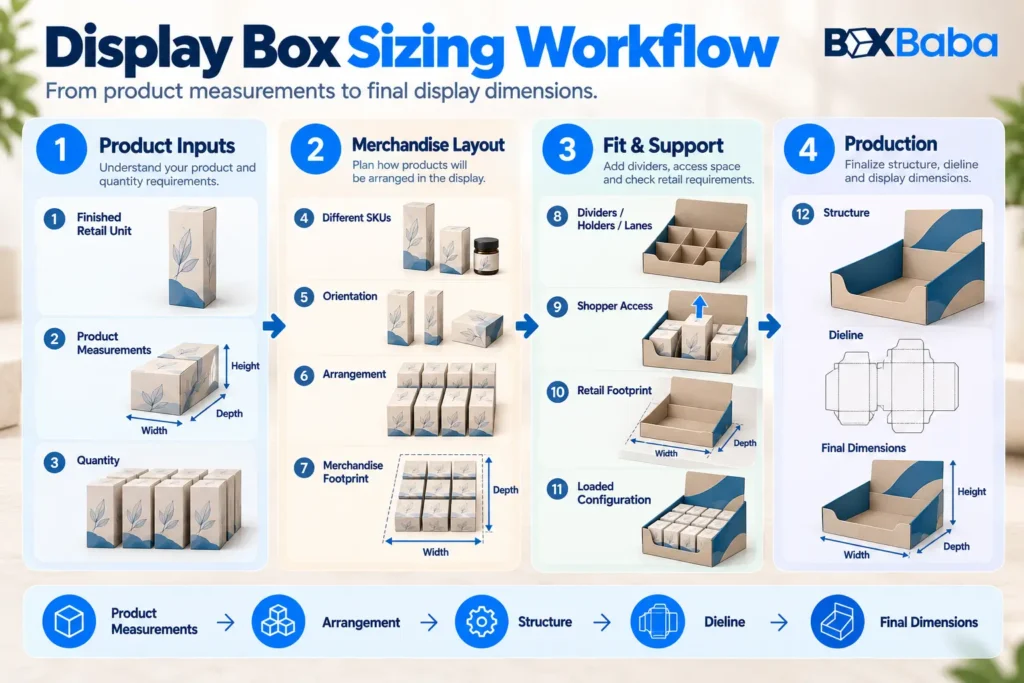
Display Box Sizing Workflow
A reliable sizing workflow is:
Confirm the finished retail unit.
Identify what physically enters the display.Verify the product measurements.
Use the maximum finished profile in the intended orientation.Set the quantity.
Confirm the desired units per display.Identify structurally different SKUs.
Do not assume every variant uses the same physical package.Confirm product orientation.
Define which panel faces the shopper.Build the merchandise arrangement.
Choose units across, rows deep, lanes or zones.Establish the merchandise footprint.
Calculate the product-only occupied space.Add the required support context.
Account for dividers, holders, lanes or tiers where needed.Check shopper access.
Confirm that products can be removed practically.Compare with the retail footprint.
Check width, depth and overall-height restrictions.Record the loaded configuration.
Keep finished unit weight and quantity available for structural review.Develop the structure and dieline.
Only then should final internal and external production dimensions be locked.
The complete relationship is:
Product Measurements → Quantity → Orientation → SKU Layout → Merchandise Footprint → Internal Requirement → Retail Footprint → Structure → Dieline → Final Dimensions
What Information Should You Send BoxBaba for Display Sizing?
For a custom sizing review, prepare:
- finished retail product dimensions;
- finished unit weight;
- quantity per display;
- number of SKUs;
- dimensions for every structurally different SKU;
- intended shopper-facing orientation;
- preferred rows or columns where known;
- available counter or shelf width;
- available depth;
- maximum overall height;
- known divider or holder requirement;
- planned header or tier where applicable;
- shopper-removal direction;
- retailer requirements where applicable.
Photos or dimensional drawings can also help where the products have unusual profiles.
BoxBaba can use these details to move from a product arrangement to a project-specific display structure rather than forcing the merchandise into a preset size.
MOQ starts from 100 units on most product lines. Artwork assistance, dieline support and digital 3D mockups are available during development. Eligible standard projects may have production turnaround starting from 5–9 business days after specifications and artwork are approved, depending on structure, material, quantity, sampling, finishing and other project requirements.
Free USA shipping is available on eligible custom packaging orders.
Once the product measurements, quantity, SKU arrangement and retail-space limits are established, explore BoxBaba Custom Display Boxes to develop the final structure around the actual merchandise.
Frequently Asked Questions
How do I calculate the size of a display box?
Start with the finished product measurements, quantity and orientation, then arrange the products into rows, columns or lanes. That creates the merchandise footprint. The final display size must also account for support, shopper access, retail-space limits and the approved structure.
Does product quantity determine display-box dimensions?
No. The same number of products can use different arrangements, creating different width and depth requirements. Quantity has to be combined with product dimensions and orientation.
Is there a standard size for retail display boxes?
There is no universal size for every custom retail display. The appropriate dimensions depend on the actual products, quantity, arrangement, support requirements, available retail space and selected structure.
What is the difference between merchandise footprint and final display size?
Merchandise footprint is the space occupied by the arranged products alone. The internal display requirement also includes necessary support and access, while the final external dimensions include the completed structural walls, header and other components.
How should I size a display for multiple SKUs?
Use the measurements and quantity of every structurally different SKU, assign each product to its intended row, lane or zone, and develop the total merchandise layout from those positions.
Should I add extra clearance around every product?
Do not apply one universal clearance. The required spacing depends on product geometry, orientation, support system, removal access and structural construction.
What information does BoxBaba need to size a custom display?
Provide the finished product dimensions and unit weight, quantity, number of SKUs, orientation, intended arrangement, available retail footprint, height restrictions and any known divider, holder, tier or header requirements.