
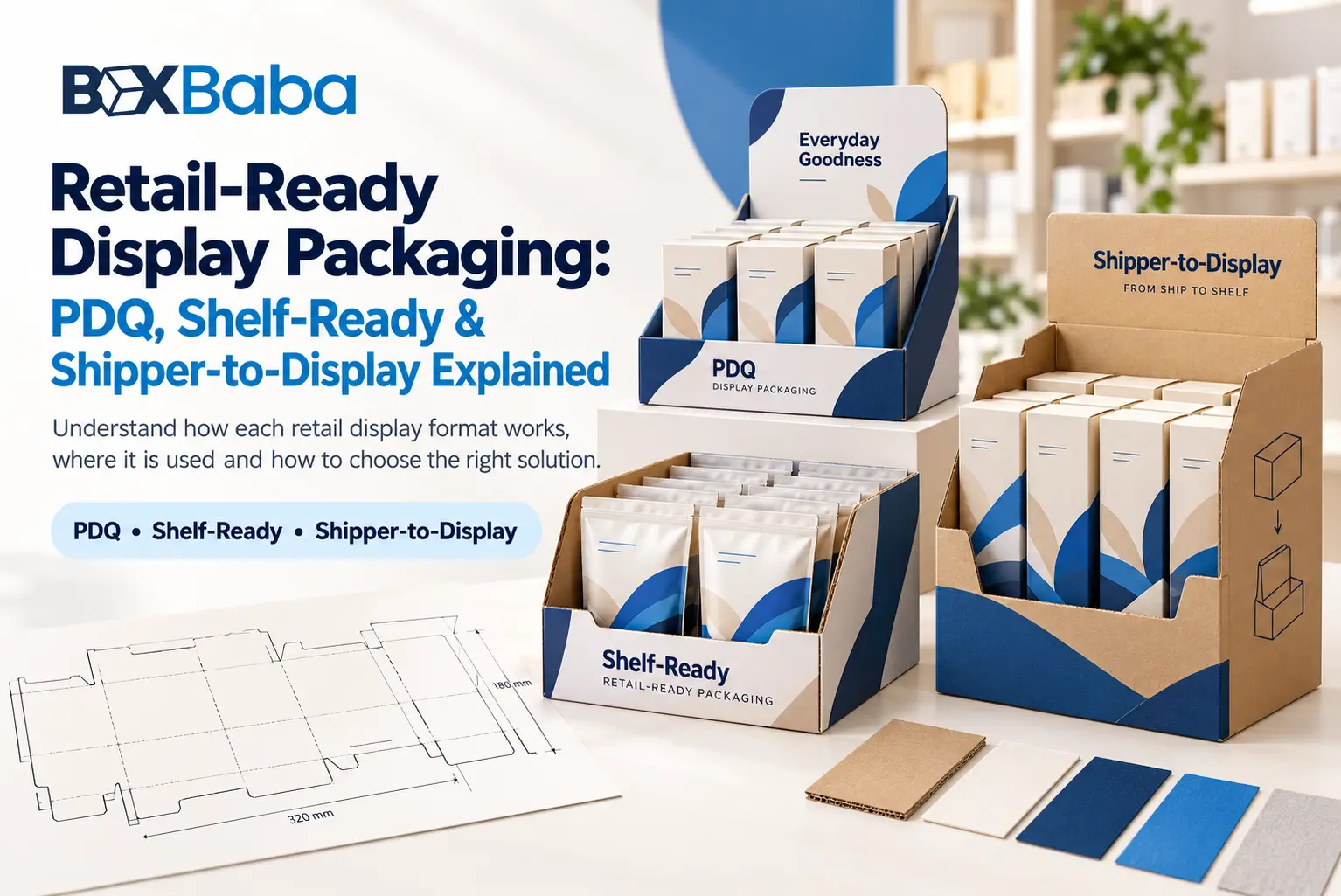
Retail-ready display packaging is built around a transition:
Packed Products → Distribution / Store Handling → Retail Setup → Shopper-Ready Presentation
Terms such as retail-ready packaging, shelf-ready packaging, PDQ, perforated display packaging and shipper-to-display packaging often overlap because they can describe different parts of the same retail workflow.
For example, one package can be shelf-ready, use a perforated tear-away panel and function as a PDQ-style display after opening.
The useful question is not simply:
Which label applies?
It is:
What must happen between the packed product configuration and the final retail presentation?
For custom merchandising structures developed around actual products and retail requirements, explore BoxBaba Custom Display Boxes.
Retail-Ready and Shelf-Ready Packaging
Retail-ready packaging (RRP) and shelf-ready packaging (SRP) are commonly used for secondary packaging that allows grouped products to move into a selling configuration without individually unpacking every retail unit.
In practice, terminology can vary by retailer, market and supplier.
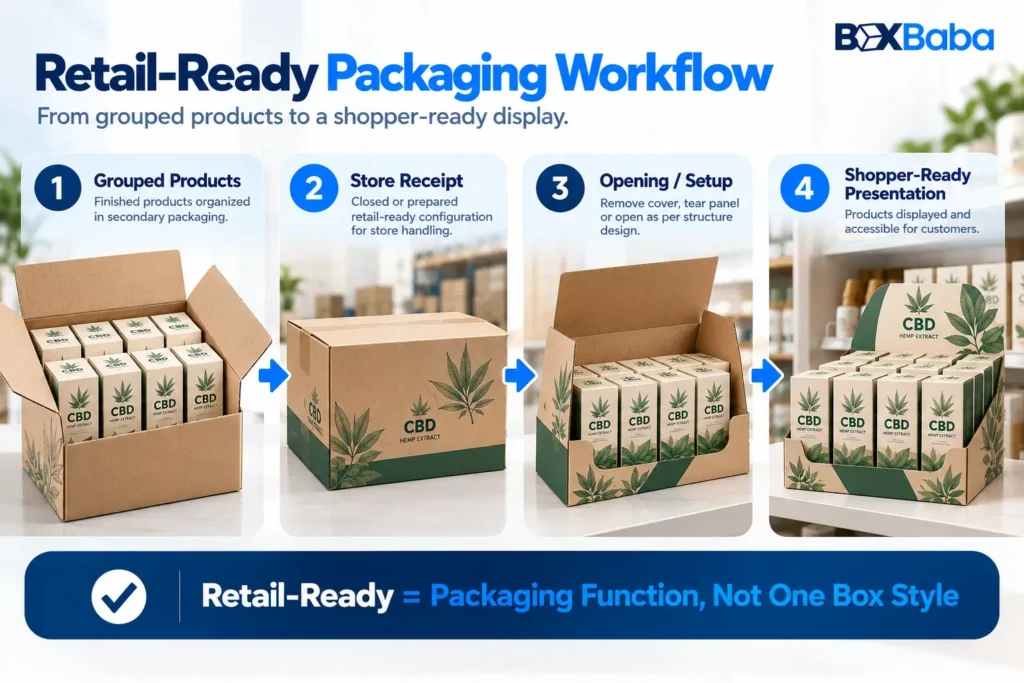
For planning purposes, it is useful to think about the workflow:
Grouped Products → Store Receipt → Opening / Setup → Shelf or Display Position → Shopper Access
A retail-ready structure might be an open tray, removable-cover case, display-ready carton, PDQ arrangement or another project-specific configuration.
The important point is that retail-ready describes the packaging retail function rather than one universal box style.
Where a retailer provides its own RRP, SRP or display-ready specification, that retailer terminology and requirements should take priority over generic definitions.
What Is a PDQ Display?
PDQ is a retail term commonly associated with merchandise that is prepared for quick in-store deployment.
Its useful structural relationship is:
Finished Products → Defined Unit Arrangement → Retail-Ready Configuration → Quick Store Placement
A PDQ may use a low tray, header, product lanes, dividers or another approved structure depending on the merchandise and retailer.
The term therefore should not be reduced to one fixed box shape.
For projects where case count, product arrangement and quick retail placement are central, BoxBaba PDQ Trays and Boxes provide the relevant commercial direction.
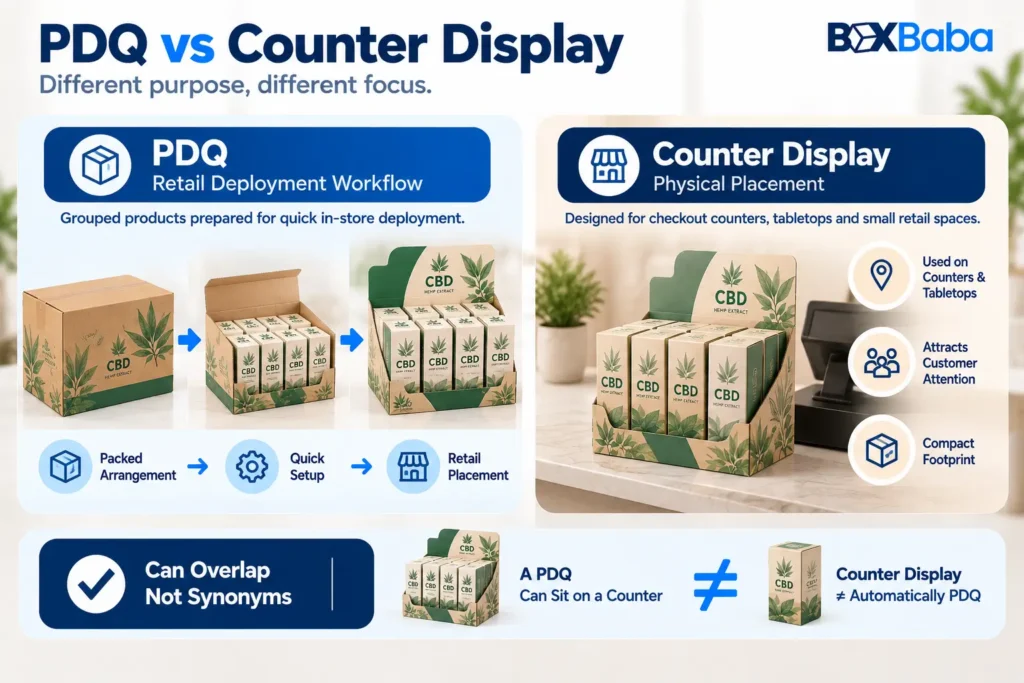
PDQ vs Counter Display
PDQ and Counter Display describe different attributes.
PDQ
→ retail-deployment workflow.
Counter Display
→ physical placement.
A PDQ can eventually sit on a counter, but a custom counter display that is assembled and loaded separately does not automatically become a PDQ.
Where a limited checkout or tabletop footprint is the main constraint, Counter Display Boxes provide the placement-led structure.
Shipper-to-Display Packaging Has Two States
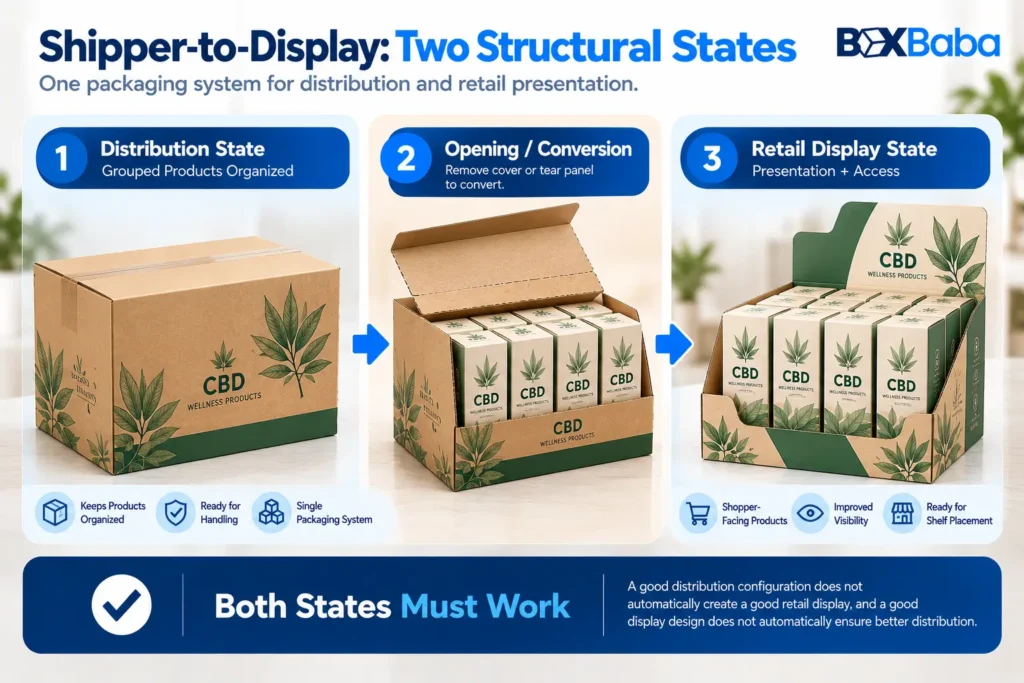
Shipper-to-display packaging uses one packaging system in both distribution and retail presentation.
Instead of:
Shipping Case → Remove All Products → Discard Case → Load Separate Display
the workflow may become:
Loaded Distribution Configuration → Store Arrival → Controlled Opening / Conversion → Remaining Retail Display
This creates two distinct structural states.
Distribution State
The closed or packed configuration needs to keep the grouped merchandise organized during the intended handling and distribution process.
Important project inputs can include the finished products, complete packed weight, orientation and outer-case configuration.
Retail Display State
After opening or conversion, the remaining structure must present the products in the intended merchandising arrangement.
It may need to maintain:
- product positioning;
- useful front facings;
- shopper access;
- SKU separation;
- practical retail footprint.
Therefore:
Good Distribution Configuration ≠ Automatically Good Retail Display
and:
Good Display Geometry ≠ Automatically Suitable Distribution Configuration
Both states need to be considered during structural development.
Where the project uses a fluted-board display direction, Corrugated Display Boxes provide the relevant material-led commercial context.
Perforation Describes the Conversion Mechanism
A perforated display uses planned tear lines so part of the structure can be removed or opened.
Its relationship is:
Closed Structure → Perforation → Controlled Panel Removal → Display State
That makes perforation a structural conversion mechanism.
It does not, by itself, tell you the complete retail workflow.
Perforation can appear in shelf-ready packaging, PDQ programs and shipper-to-display structures.
PDQ and Perforated Are Not Synonyms
The simplest distinction is:
PDQ
→ describes the retail-ready deployment context.
Perforated Display
→ describes how part of the structure tears away.
A single package can be both.
For example:
Loaded Case → Tear-Away Panel → Retail Product Tray
could be described as retail-ready, perforated and PDQ-style where those attributes all apply.
The deeper structural comparison belongs to the dedicated PDQ vs Perforated Display Boxes article once that guide is published.
The planned Perforated Display Boxes commercial page should not be internally linked until its final URL is live.
Shelf-Ready Packaging Does Not Always Require Perforation
A shelf-ready pack can reach its merchandising state in several ways.
Depending on the approved structure, store staff may:
- remove an outer cover;
- lift away a top section;
- remove film;
- unfold part of the structure;
- open a tray;
- tear away a perforated section.
Perforation is one option rather than a requirement of every shelf-ready package.
The real question is:
Can the grouped merchandise move into its intended retail presentation without unnecessary product-by-product handling?
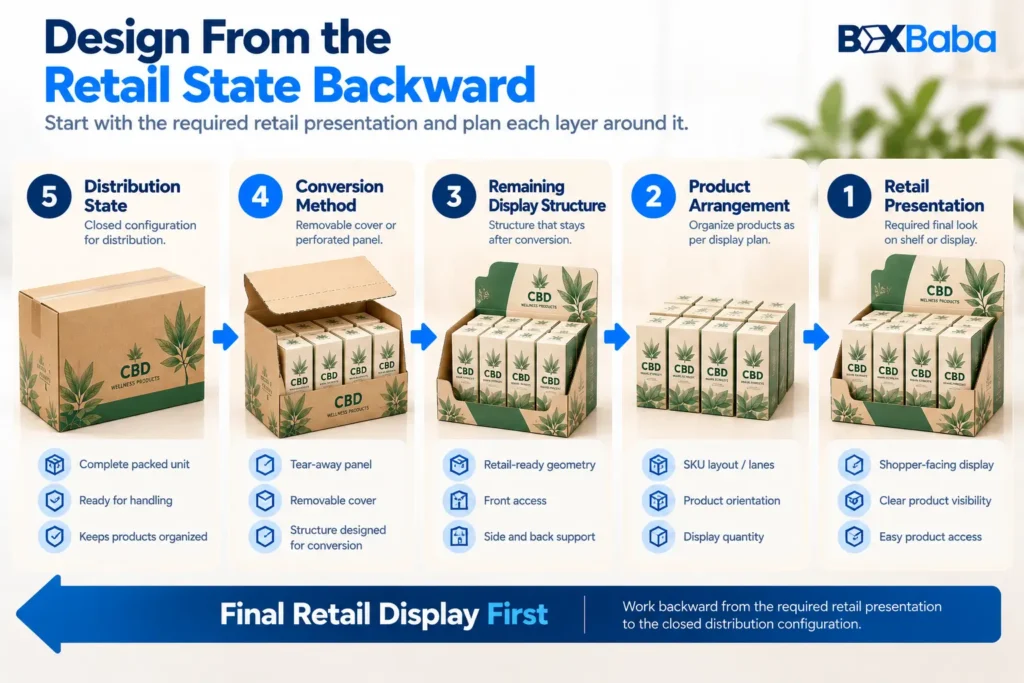
Design From the Final Retail State Backward
A strong retail-ready brief should define the intended retail presentation before the closed distribution structure is finalized.
First establish:
- what products remain inside the display;
- total unit count;
- number of SKUs;
- shopper-facing orientation;
- final shelf or counter footprint;
- which panels remain;
- which sections are removed;
- required product support;
- shopper access.
Then develop the conversion and distribution state around those requirements.
A useful sequence is:
Required Retail Presentation → Product Arrangement → Remaining Display Structure → Conversion Method → Closed Distribution Configuration
This is more reliable than designing an ordinary shipping case first and trying to turn it into a display afterward.
Keep Product Orientation Consistent Through the Transition
Retail-ready packaging can create two orientation requirements:
Packed Orientation
and:
Shopper-Facing Orientation
Where practical, the packed arrangement should support the intended retail presentation after opening.
If every product has to be removed, rotated and individually rearranged after the case is opened, much of the purpose of a retail-ready workflow can be lost.
For example, products may need:
- front labels facing the shopper;
- different SKUs kept in separate lanes;
- closures facing consistently;
- access from the front or top.
The intended retail orientation should therefore be part of the structural brief.
Define Case Count and Display Count Separately
A shipping case and a retail display do not automatically contain the same quantity.
Some projects use:
One Loaded Case → One Display
while others may use:
One Shipping Case → Multiple Display Trays
Confirm:
- total packed units;
- display units;
- number of SKUs;
- units per SKU;
- rows or lanes;
- whether the complete case becomes the retail display.
Do not assume:
Case Quantity = Display Quantity
unless that relationship is part of the actual fulfillment plan.
The Final Retail Footprint Still Matters
Even when the products arrive in a retail-ready structure, the opened or converted display still has to fit its assigned retail space.
Confirm the final display against:
- shelf width;
- shelf depth;
- overall height;
- vertical clearance;
- header clearance;
- counter footprint where applicable;
- retailer fixture restrictions.
A structure can be convenient during distribution but still be unsuitable if its final footprint does not fit the assigned retail location.
Where broader in-store facings, shopper access and footprint requirements drive the project, Retail Display Boxes provide the relevant merchandising-led commercial direction.
The deeper calculation of available retail space belongs to the later Retail Display Footprint Guide.
The Remaining Structure Has to Work After Conversion
A tear-away panel should not be evaluated only by how easily it opens.
What remains matters just as much.
After conversion, check whether the retained structure still provides suitable:
- front retention;
- side support;
- product visibility;
- shopper access;
- SKU organization;
- display geometry.
Removing more material is not automatically better.
Too little remaining structure may reduce product support, while too much can hide merchandise or restrict access.
A better relationship is:
Practical Conversion + Functional Remaining Display
Product Support Must Work in Both States
Dividers, lanes, holders and retaining features may have to work before and after the package is converted.
The support arrangement should not become loose, misaligned or obstructive when an outer panel or cover is removed.
DB-05 only needs to identify this as a retail-ready requirement.
The deeper question of when a display needs dividers or product lanes belongs to its dedicated engineering article.
Shopper Access and Replenishment Come After Setup
The retail-ready workflow is not complete merely because the package opens.
The final structure must still allow shoppers to see and remove products appropriately.
It should also be clear how store staff are expected to replenish the display where replenishment is part of the program.
At this stage, record:
Shopper Removal Direction
and:
Staff Replenishment Direction
The detailed replenishment geometry belongs to the later How to Plan Display Box Replenishment guide.
Flat-Packed, Partially Assembled and Loaded Displays Use Different Workflows
Not every custom display travels through the supply chain with products already inside it.
A project may use:
Flat-Packed Display
→ assembled and loaded later.
Partially Assembled Display
→ selected setup steps remain.
Loaded Display
→ products travel in their intended display arrangement.
These are different fulfillment workflows.
A flat-packed counter display can still be a useful retail display, but it is not equivalent to a loaded shipper-to-display system.
Where merchandise travels inside the structure, the complete packed configuration needs to be included in the project brief.
Retail-Ready Does Not Automatically Mean Retailer-Approved
Retail-ready describes a packaging function.
It does not establish approval by a particular retailer.
Individual retailers may specify requirements for:
- dimensions;
- labels;
- barcodes;
- case identification;
- opening method;
- product visibility;
- shelf placement;
- handling;
- other program-specific details.
Where a retailer has supplied a packaging manual, specification or merchandising requirement, use that document as an input before approving the structure.
Do not assume that one generic PDQ, perforated case or shelf-ready structure automatically satisfies every retailer.
Retail-Ready Display Packaging Is Usually a Separate Layer From Primary Packaging
The individual saleable product may already have its own bottle, jar, pouch, carton or other primary/secondary retail packaging.
The retail-ready display can then form an additional grouped merchandising layer:
Individual Retail Product → Grouped Retail-Ready / Display Packaging
Do not assume the display automatically provides specialized product functions such as liquid containment, barrier performance, tamper resistance, child resistance or food-contact suitability.
Where those requirements apply, they must be specified and verified at the appropriate packaging layer.
PDQ, Shelf-Ready, Perforated or Shipper-to-Display?
Use the dominant requirement as the starting point.
Main Requirement | Starting Context | What It Describes |
Products need quick organized retail placement | PDQ | Retail deployment workflow |
Grouped products need simplified shelf placement | Shelf-Ready Packaging | Shelf/display-ready function |
One loaded structure converts from distribution to display | Shipper-to-Display | Two-state packaging system |
Part of the structure must tear away | Perforated Display | Conversion mechanism |
Limited countertop space leads the brief | Counter Display | Placement |
Broader in-store merchandising leads the brief | Retail Display | Merchandising context |
More than one description can apply to the same finished structure.
The purpose of the terminology is to clarify the project requirements—not force the package into only one label.
Common Retail-Ready Packaging Mistakes
Treating PDQ and Perforated as the Same Thing
PDQ describes a retail-deployment context. Perforation describes a tear-away mechanism.
Better approach: define the workflow and conversion method separately.
Designing Only the Closed Case
A closed shipping structure may not leave a useful display after opening.
Better approach: establish the final retail state first.
Ignoring What Remains After a Tear-Away Panel Is Removed
A panel can open successfully while leaving poor retention or access.
Better approach: evaluate the remaining display geometry.
Requiring Too Much Product Rearrangement
A structure that needs every unit to be manually repositioned may not achieve the intended quick-deployment workflow.
Better approach: align packed and retail orientation where practical.
Assuming Retail-Ready Means Retailer-Approved
Retailer programs can have their own requirements.
Better approach: use the applicable retailer specification where one exists.
Evaluating Only the Empty Structure
A loaded retail-ready package has a different structural condition from the empty tray.
Better approach: include the complete packed merchandise configuration in the project brief.
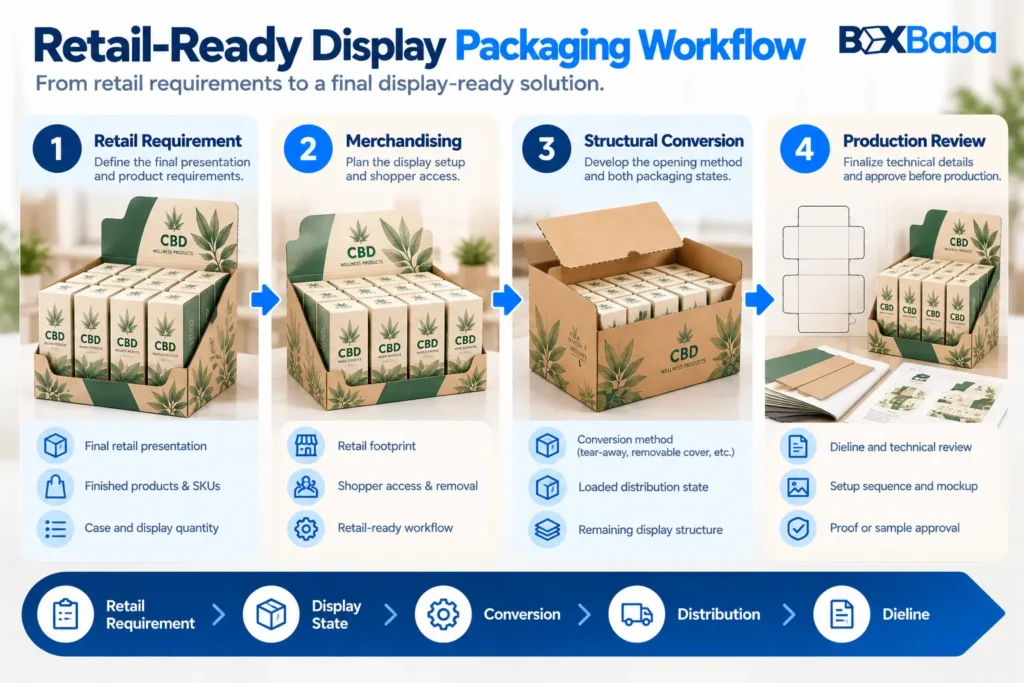
Retail-Ready Display Packaging Workflow
A practical development sequence is:
Define the final retail presentation.
Establish where and how the products need to appear after setup.Identify the finished retail products.
Confirm what physically sits inside the grouped package.Set case and display counts.
Define units, SKUs and arrangement.Confirm the final retail footprint.
Check shelf, counter and overall-height constraints.Define shopper access.
Know how products will be removed.Choose the retail-ready workflow.
PDQ, shelf-ready, shipper-to-display or another suitable approach.Define the conversion method.
Perforation, removable cover, open tray or another approved mechanism.Review the packed state.
Include the complete product arrangement and loaded configuration.Confirm what structure remains after opening.
Retain enough geometry for product support and access.Develop the dieline and setup sequence.
Lock folds, cuts, perforations and retained panels.Review the intended setup before production.
Use the appropriate proof or sample route for the project.
The overall relationship is:
Retail Requirement → Product Arrangement → Retail Display State → Conversion Method → Distribution State → Dieline → Setup Review
What Information Should You Provide for a Retail-Ready Display?
Prepare:
- finished product dimensions;
- complete finished unit weight;
- case quantity;
- display quantity;
- number of SKUs;
- units per SKU;
- product orientation;
- final shelf or counter footprint;
- maximum overall height;
- required shopper-facing panel;
- intended store setup method;
- whether products travel inside the display;
- whether a cover or panel needs to be removed;
- support requirements where known;
- retailer specifications where applicable;
- artwork status;
- total order quantity;
- delivery destination.
These inputs define both the retail presentation and the process required to reach it.
Developing Retail-Ready Display Packaging With BoxBaba
BoxBaba develops custom display packaging around the finished merchandise, product count, SKU arrangement, retail footprint and intended setup workflow.
For a quick-deployment, product-arrangement-led project, explore PDQ Trays and Boxes. Where broader in-store presentation is the primary context, Retail Display Boxes provide the relevant commercial direction.
MOQ starts from 100 units on most product lines.
Artwork assistance, dieline support and digital 3D mockups are available during development. Eligible standard projects may have production turnaround starting from 5–9 business days after specifications and artwork approval, depending on structure, material, quantity, sampling, finishing and other project requirements.
Free USA shipping is available on eligible custom packaging orders.
For the broader range, explore Custom Display Boxes and share the finished product dimensions, quantity, SKU arrangement, loaded configuration, retail footprint and intended store-setup workflow.
Frequently Asked Questions
What is retail-ready display packaging?
Retail-ready display packaging groups products in secondary packaging that can move into an intended selling configuration with reduced unpacking or product-by-product setup. The exact structure depends on the products, retail location and retailer requirements.
Are retail-ready and shelf-ready packaging the same?
The terms are often used interchangeably. Some retailers or suppliers may use them with slightly different emphasis, so the applicable retailer terminology and packaging specification should be followed where one exists.
What is a PDQ display?
PDQ commonly refers to a product arrangement developed for quick retail deployment. It describes the retail workflow more than one universal tray or box shape.
Is every PDQ perforated?
No. Perforation is a tear-away conversion mechanism. A PDQ may use perforation, but perforation is not required for every PDQ configuration.
What is shipper-to-display packaging?
Shipper-to-display packaging uses one packaging system in a packed distribution state and then converts into a retail-display state through an approved opening or setup process.
Does shelf-ready packaging always require tear-away panels?
No. Tear-away perforation is one option. A shelf-ready system can also use a removable cover, tray, film removal or another approved setup mechanism.
What information is needed for a retail-ready display quote?
Provide finished product dimensions and weight, case and display quantity, number of SKUs, product arrangement, final retail footprint, intended setup method, loaded or flat-packed state, retailer requirements where applicable and any known support or conversion needs.