
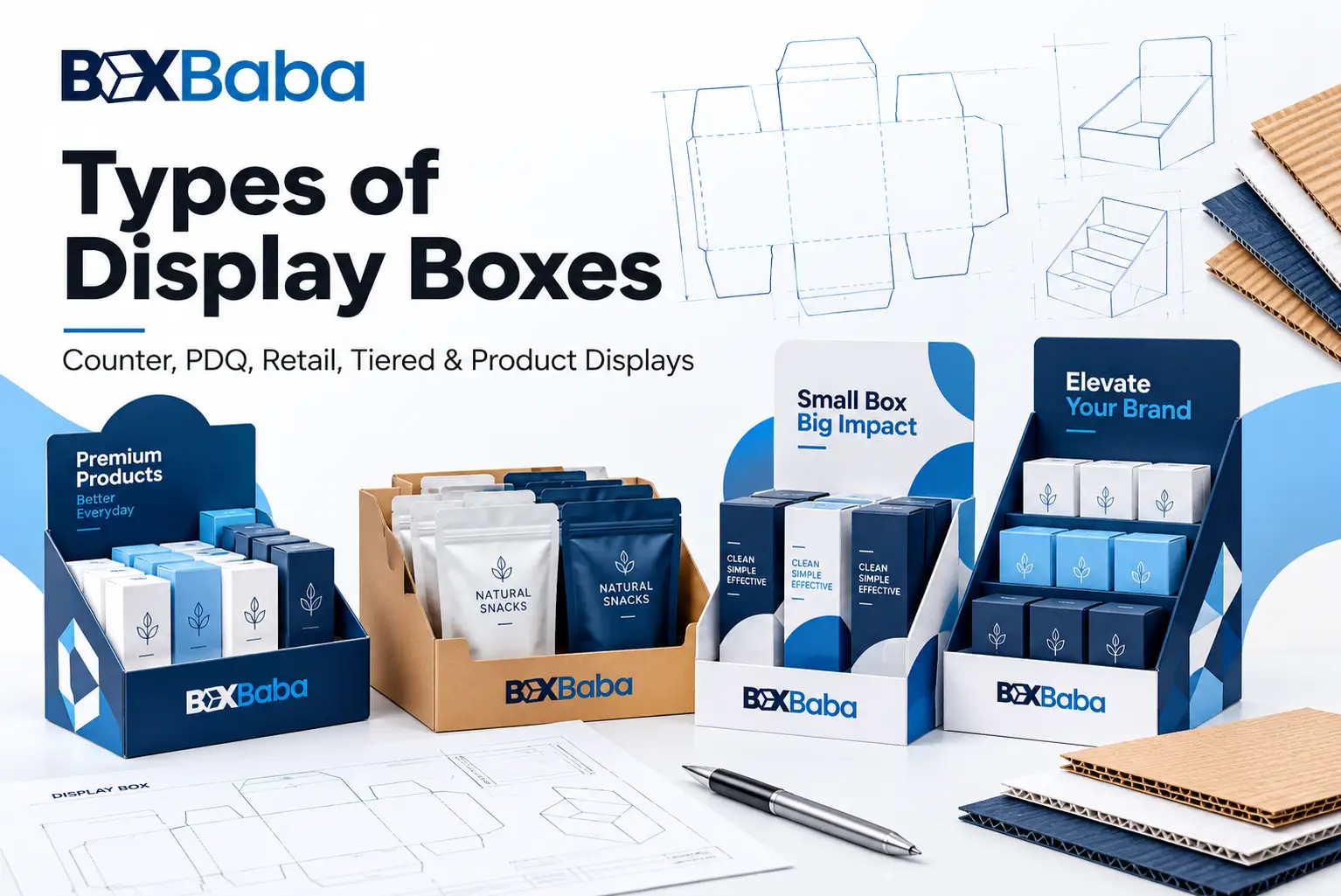
Display-box terms can be confusing because they do not all describe the same thing. Some names tell you where the display sits, while others describe how it works, how products are supported, what material it uses or what merchandise it holds.
That means one finished retail display can belong to several classifications at the same time.
For example, a bottle display could be:
Counter + Tiered + Die Cut + Bottle Holder + Cardboard + Tincture Display
without any of those descriptions being incorrect.
A useful way to understand the main types of display boxes is:
Placement → Merchandising Context → Retail Workflow → Product Geometry → Structural Geometry → Product Support → Material → Application
This guide explains what those classifications mean and how they relate to one another. If you are already comparing commercial structures, start with BoxBaba Custom Display Boxes.
How Display Box Types Are Classified
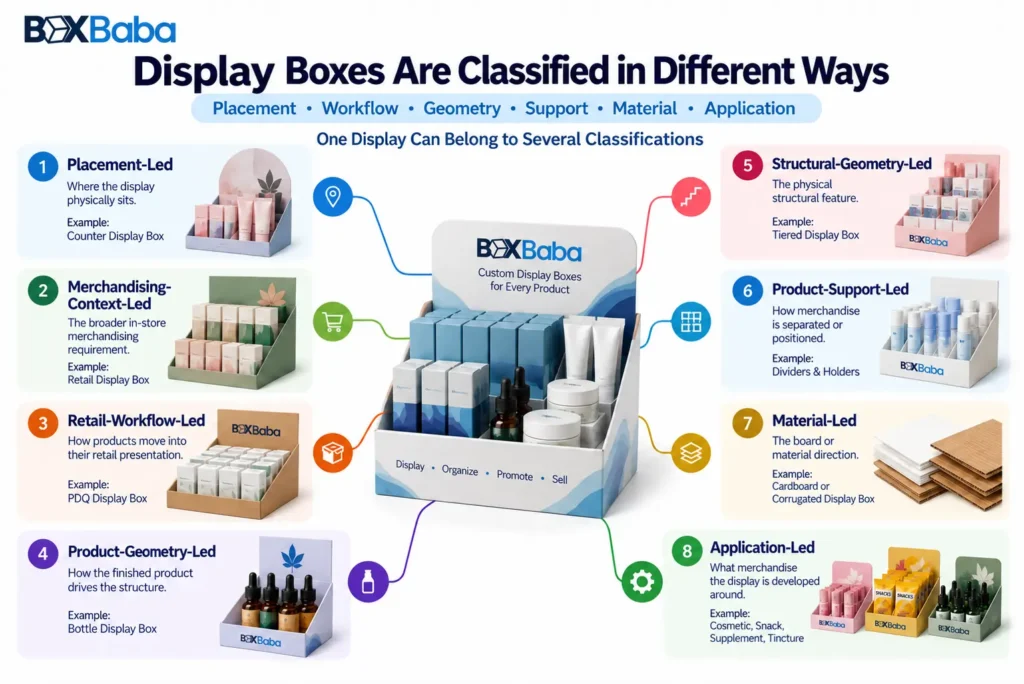
Display boxes are easier to understand when they are grouped by the attribute being described rather than placed in one flat list.
Classification | What It Describes | Examples |
Placement-led | Where the display physically sits | Counter Display |
Merchandising-context-led | The broader in-store merchandising requirement | Retail Display |
Retail-workflow-led | How products move into their retail presentation | PDQ, Perforated Display |
Product-geometry-led | How the finished product drives the structure | Product Display Box |
Structural-geometry-led | The physical structural feature | Tiered, Die Cut, Open Tray |
Product-support-led | How merchandise is separated or positioned | Holder, Divider, Product Lane |
Material-led | The board or material direction | Cardboard, Corrugated |
Application-led | What merchandise the display is developed around | Cosmetic, Snack, Supplement, Tincture |
These classifications overlap. The same display can therefore be described by its placement, structure, material and product application at the same time.
The wider retail-display industry also uses floor-standing displays, pallet displays, sidekicks, dump bins and other large POP fixtures. This guide focuses primarily on the box, tray and compact retail-display structures connected with BoxBaba Display Boxes cluster rather than presenting every retail merchandising fixture as a BoxBaba product.
Counter Display Boxes: A Placement-Led Type
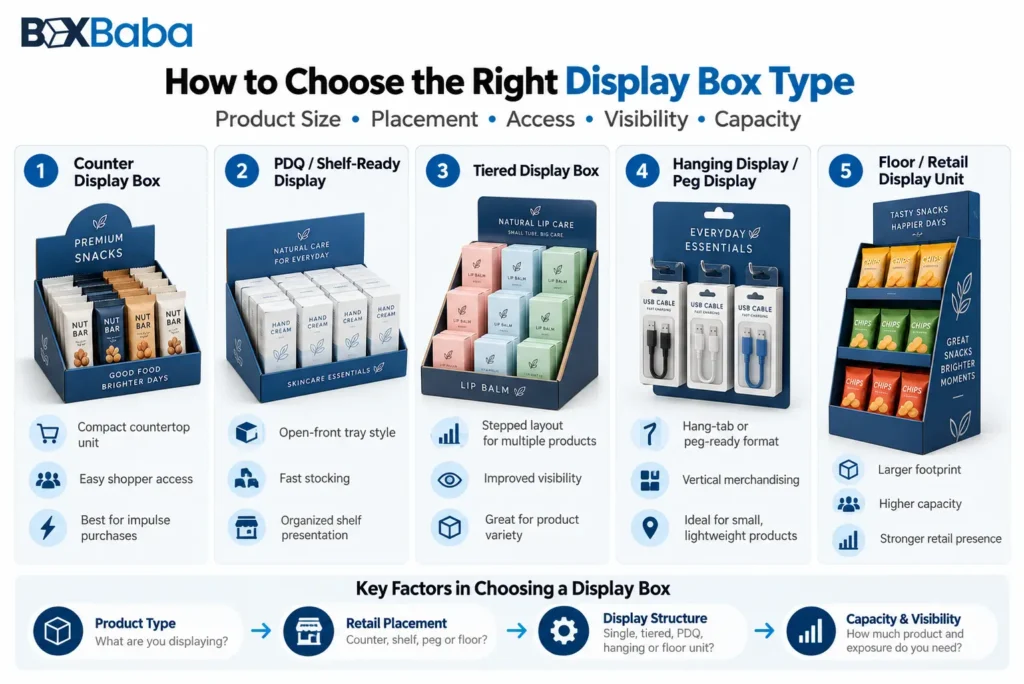
A counter display is defined primarily by where it must fit.
The main planning relationship is:
Available Counter Footprint → Finished Products → Quantity → Arrangement → Display Structure
Counter displays may include an open tray, dividers, holders, tiers or a header. Those additional features do not change the fact that the dominant requirement is the available countertop space.
A counter-led structure is appropriate when the display must work within a checkout, service counter or other compact tabletop area while keeping products accessible to shoppers.
For projects where the available counter footprint is the main constraint, see BoxBaba Counter Display Boxes.
Retail Display Boxes: A Merchandising-Context Type
Retail Display Boxes describe a broader merchandising problem.
Instead of beginning only with countertop dimensions, the planning context can include:
Retail Placement → Product Facings → Shopper Access → Replenishment → Retail Footprint
A retail display may still sit on a counter, but the dominant question is broader:
How should the merchandise be presented and managed in the retail environment?
This can involve shelf positioning, visible product facings, shopper removal, multi-SKU organization and staff replenishment.
The difference is therefore:
Counter Display
→ limited counter footprint leads the decision.
Retail Display
→ broader in-store merchandising requirements lead the decision.
Where the retail environment and merchandise presentation are the primary concerns, explore Retail Display Boxes.
PDQ Trays and Boxes: A Retail-Workflow Type
PDQ packaging is better understood by its retail workflow than by one fixed shape.
The basic relationship is:
Finished Products → Defined Unit Arrangement → Retail-Ready Configuration → Store Placement
The goal is to keep merchandise organized so it can move into its retail presentation with limited store-level setup.
A PDQ may ultimately sit on a counter or shelf, which is why PDQ and Counter Display are not synonyms.
Counter describes placement.
PDQ describes the retail-ready arrangement and setup process.
For projects where organized case count and retail-ready placement are central to the brief, see PDQ Trays and Boxes.
Perforated Display Boxes: A Tear-Away Conversion Type
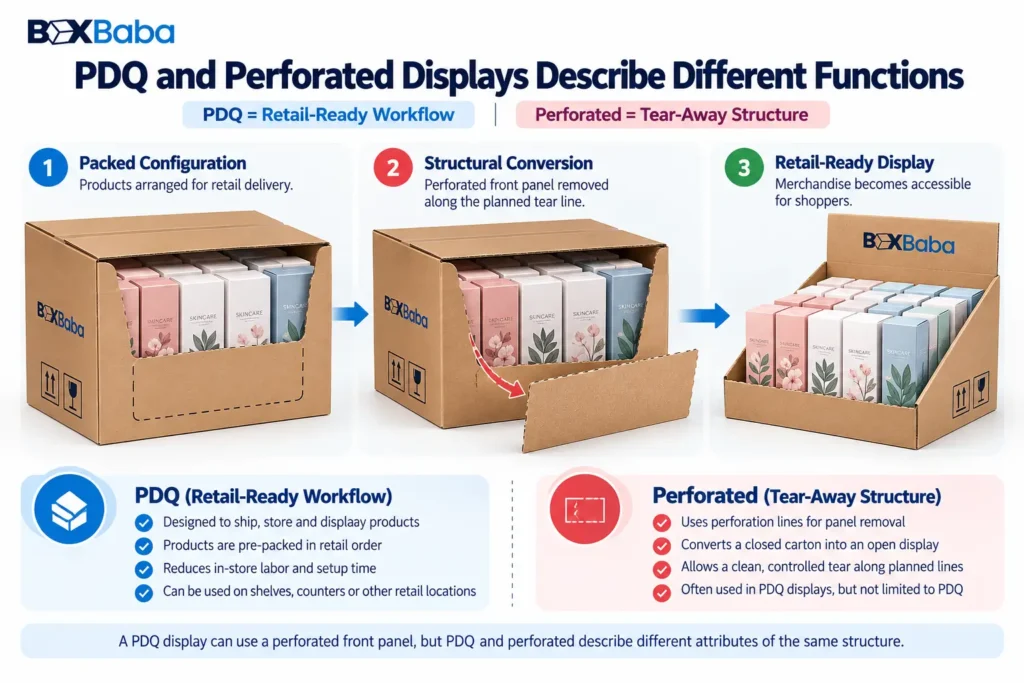
Perforated displays are defined by a planned structural conversion.
Their basic relationship is:
Closed Structure → Planned Perforation → Panel Removal → Open Display Configuration
A tear-away panel may allow a packed structure to convert into a more open merchandising format.
This explains why PDQ and perforated displays can overlap without meaning the same thing.
PDQ
describes the retail-ready workflow.
Perforated Display
describes the tear-away structural mechanism.
A PDQ can use perforation, and a perforated display can support a PDQ-style setup.
BoxBaba dedicated Perforated Display Boxes page should be linked here only after that commercial page is live.
Product Display Boxes: A Product-Geometry Type
Product Display Boxes begin with the merchandise itself.
The structural relationship is:
Finished Product → Dimensions → Orientation → Quantity → Visibility → Support → Shopper Access
This approach is useful where the product physical geometry is the dominant structural issue.
For example, a group of bottles may require specific spacing or support regardless of whether the completed display ultimately sits on a counter or shelf.
That makes the difference:
Product Display Box
→ product geometry leads.
Counter Display Box
→ available counter footprint leads.
For merchandise-driven structural planning, explore BoxBaba Product Display Box.
Tiered Display Boxes: A Vertical-Geometry Type
Tiered displays position products at different heights.
Their core relationship is:
Multiple Product Rows → Rear-Product Visibility Problem → Vertical Separation → Tiered Presentation
Tiering can help when front merchandise obscures products behind it or where several product rows need clearer visual separation.
A tiered display is not necessarily a completely separate commercial family. It can also be:
- counter-based;
- product-led;
- cardboard;
- corrugated;
- die cut;
- application-specific.
The term tiered therefore describes a structural feature.
The detailed decision about when tiers are actually needed belongs to the separate When Does a Retail Display Need Tiers? engineering article later in this topical cluster.
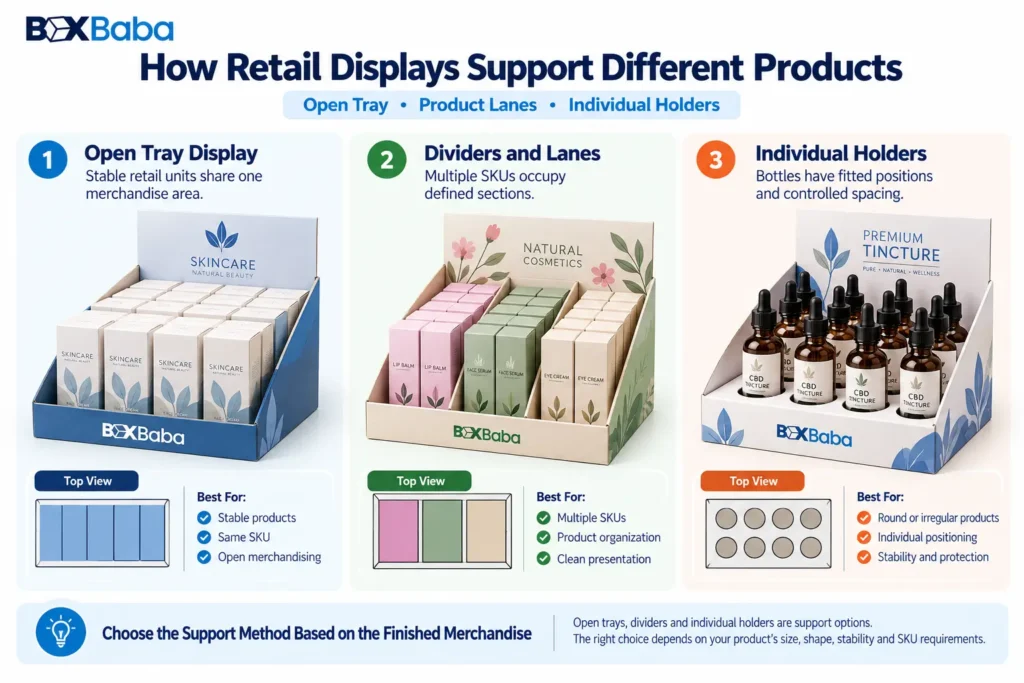
Open Tray Displays: The Simpler Support Direction
An open tray organizes finished merchandise without giving each product its own individual position.
The general relationship is:
Stable Finished Products → Defined Tray Footprint → Open Shopper Access
This can work where cartons, packs, bottles or other finished retail units already remain sufficiently organized without individual holders.
An open tray may still use a retaining front, side walls, a header or simple dividers. The term describes the basic support approach rather than an absence of structural planning.
If products need more control than an open tray provides, the next question becomes whether they require product lanes, dividers or individual holders.
Divided Displays and Product Lanes
Dividers organize merchandise into controlled sections.
Their relationship is:
Multiple Products or SKUs → Separation Requirement → Divider / Lane Geometry
They can be useful where different SKUs need defined positions, narrow products require lateral organization or merchandise would otherwise shift inside a shared tray.
The important point is that divided display describes the support method.
The overall display could still be a Counter Display, Retail Display, PDQ, Cardboard Display or product-specific display.
Dividers should therefore solve a specific separation or positioning problem rather than being added merely because customization is available.
Bottle-Holder and Individual-Position Displays
Some merchandise needs more controlled positioning than a shared lane can provide.
Bottle, tube or similar product displays may use individual holder positions developed around:
Finished Product Profile → Insertion Path → Support Point → Holder Geometry
This can help establish repeated product locations and spacing.
However, a holder opening should not be selected from a nominal bottle diameter alone. The complete finished profile and intended support point still matter.
This distinction becomes particularly relevant in bottle-led applications such as Tincture Display Boxes or Supplement Display Boxes, where closure geometry and product orientation can influence the final support method.
Die Cut Display Boxes: A Custom-Geometry Type
Die Cut Display Boxes are defined by custom-cut geometry that is important to how the display functions.
The cuts may create:
- product openings;
- holder positions;
- access areas;
- custom front profiles;
- header shapes;
- tabs or other structural elements.
Their core relationship is:
Merchandising Requirement → Custom-Cut Geometry → Display Structure
Many packaging structures involve die cutting during manufacturing, but that does not mean every customized display should be treated as a separate Die Cut Display type.
The term becomes meaningful when the custom-cut geometry itself is central to the merchandising structure.
For the commercial geometry-led option, explore Die Cut Display Boxes.
Die Cut vs Bottle Holder
These terms describe different attributes.
Die Cut
→ custom-cut structural geometry.
Bottle Holder
→ product-support function.
A bottle-holder platform can use die-cut openings and therefore fit both classifications.
Displays With Integrated Display Lids
Some display types are defined by their construction rather than placement or product application.
BoxBaba examples include:
Structure | Defining Feature |
Auto Bottom With Display Lid | Automatic base erection combined with a display-oriented upper section |
Double Wall Display Lid | Folded or doubled side-wall construction combined with a display-oriented lid |
Four Corner With Display Lid | Four-corner tray construction combined with an integrated display lid |
These are construction-led styles.
One important distinction is that Double Wall Display Lid does not automatically mean double-wall corrugated board. One term describes a box-style construction; the other describes a corrugated-board construction.
These structures illustrate why display terminology cannot be organized only by placement terms such as counter or shelf.
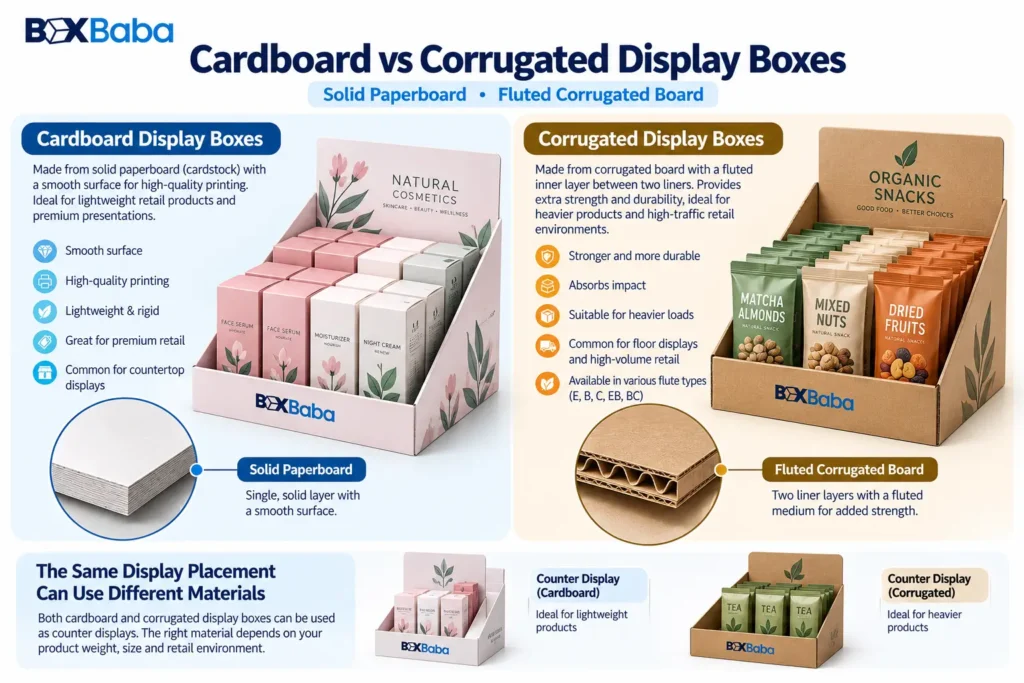
Cardboard Display Boxes: A Material-Led Type
Cardboard Display Boxes describe a display primarily through its solid-paperboard or cardstock construction.
Their relationship is:
Compatible Merchandise Arrangement → Solid Paperboard Structure → Retail Display
Material does not tell you where the display sits or what product it contains.
A cardboard structure could also be counter-based, tiered, die cut or product-specific.
For the solid-paperboard commercial direction, explore Cardboard Display Boxes.
Corrugated Display Boxes: A Fluted-Board Type
Corrugated Display Boxes describe a fluted-board-led structure.
Their relationship is:
Approved Display Configuration → Corrugated Board Structure → Retail Merchandising
A corrugated display may also be a PDQ, perforated display, counter display, die-cut display or product-specific display.
Material should therefore follow the actual approved display configuration rather than being assumed from the product category alone.
For the fluted-board commercial direction, explore Corrugated Display Boxes.
The deeper decision between paperboard and corrugated belongs to the later Cardboard vs Corrugated Display Boxes comparison article.
Product-Specific Display Boxes: An Application-Led Type
Application-led pages are defined by the merchandise being displayed.
Examples in BoxBaba current cluster include:
- Cosmetic Display Boxes;
- Lip Balm Display Boxes;
- Medicine Display Boxes;
- Snack Display Boxes;
- Supplement Display Boxes;
- Tincture Display Boxes;
- Pen Display Boxes;
- Pre Roll Display Boxes;
- Ring Display Boxes;
- Beard Oil Display Boxes.
Their purpose should be more specific than simply saying:
This display holds this product.
The merchandise should change the structural brief.
For example, Snack Display Boxes may need to account for the difference between rigid cartons and flexible filled packs, while Supplement Display Boxes may involve bottle or carton profiles, closure geometry and multi-SKU arrangements.
Likewise, Cosmetic Display Boxes can involve tubes, jars, cartons, bottles and mixed product families within the same merchandising program.
Those application-specific structural questions belong primarily on the individual product pages rather than being repeated deeply in this taxonomy guide.
One Display Can Belong to Several Types
This is the most important principle for understanding the terminology.
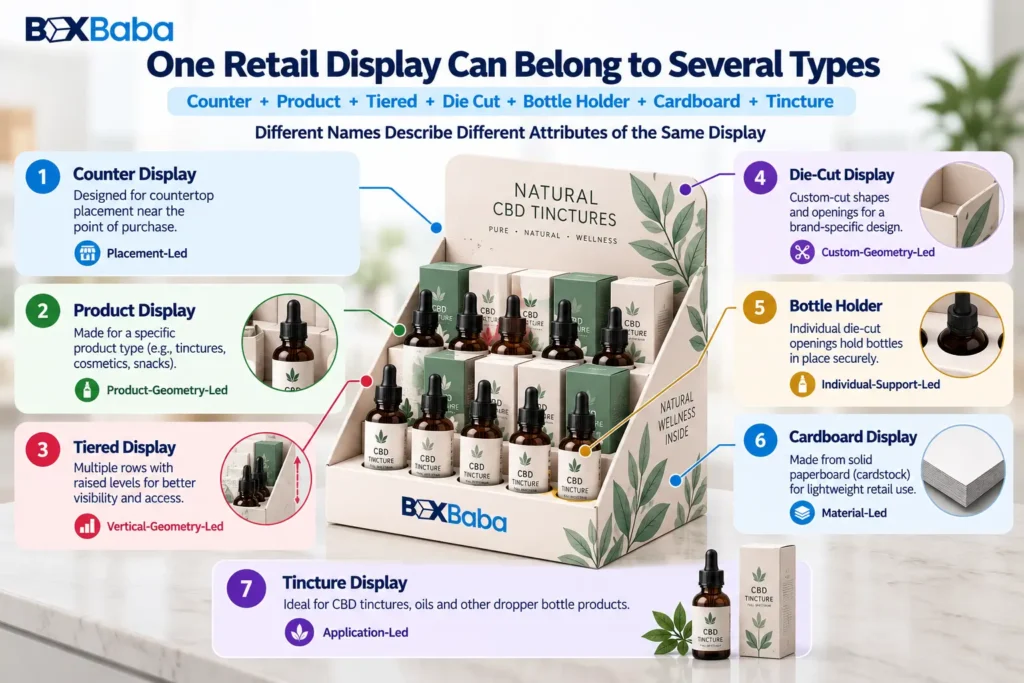
Consider a hypothetical display containing several tincture bottles.
It could be:
Counter
because it sits on a checkout counter.
Product Display
because bottle geometry drives the structure.
Tiered
because rear bottles are raised.
Die Cut
because custom-cut openings position the bottles.
Bottle Holder
because each unit has a defined support position.
Cardboard
because solid paperboard is selected.
Tincture Display
because tincture bottles are the merchandise.
These names are not necessarily competing.
They answer different questions:
Where does it sit?
What merchandise drives the structure?
What structural feature does it use?
How are products supported?
What material is used?
What product category is being displayed?
This is why two display-box terms that appear similar in search results should not automatically be treated as duplicate entities.
How the Main Display Types Differ
Display Type | Primary Attribute | Main Question |
Counter Display | Placement | Must it fit within a defined counter footprint? |
Retail Display | Merchandising context | How should products be presented and managed in store? |
PDQ | Retail workflow | Does merchandise need a retail-ready arrangement with limited setup? |
Perforated Display | Structural conversion | Does a panel need to tear away to expose the display? |
Product Display | Product geometry | Does the finished merchandise itself drive the structure? |
Tiered Display | Vertical geometry | Do rows need different heights for visibility or access? |
Open Tray | Basic support | Can products remain organized without individual positions? |
Divided Display | Separation | Do products or SKUs need controlled lanes? |
Bottle Holder | Individual support | Do products need defined positions? |
Die Cut Display | Custom geometry | Are custom openings or cuts central to the display? |
Cardboard Display | Material | Is solid paperboard the selected material direction? |
Corrugated Display | Material | Is fluted board the selected material direction? |
Product-Specific Display | Application | Does a particular product introduce unique structural requirements? |
The table is a terminology guide. It does not replace actual structural development around the finished merchandise.
Display Types That Are Commonly Confused
Several combinations are worth remembering.
Counter vs PDQ: Counter describes placement; PDQ describes retail-ready workflow. A PDQ can sit on a counter.
PDQ vs Perforated: PDQ describes how the merchandise reaches retail presentation; perforated describes a tear-away structural mechanism. One structure can be both.
Product Display vs Retail Display: Product Display starts from merchandise geometry, while Retail Display starts from the wider in-store merchandising requirement.
Die Cut vs Bottle Holder: Die cut describes geometry; bottle holder describes support. A holder can be produced using die-cut openings.
Cardboard vs Counter Display: Cardboard describes material; counter describes placement. A Counter Display can use a cardboard structure.
These distinctions matter because the same finished display can legitimately fit several categories.
What About Floor Displays, Pallet Displays, Sidekicks and Dump Bins?
The wider POP and retail-display industry also includes floor-standing displays, pallet displays, sidekicks or power wings, dump bins, end-cap units and other freestanding structures.
Those formats belong to the broader retail-merchandising universe.
DB-02 focuses on the compact box and tray structures that connect directly with BoxBaba current Display Boxes taxonomy, so these wider formats are acknowledged without implying that they are all existing BoxBaba product offerings.
Which Display Type Should You Start With?
Understanding the terminology is the first step. Choosing the final display requires identifying the dominant requirement.
If the main constraint is:
It has to fit this checkout space.
start with the Counter Display context.
If:
The products need to arrive organized for quick retail placement.
start with PDQ.
If:
The product shape is driving the structure.
start with Product Display planning.
If:
Rear products need greater visibility.
evaluate Tiering.
If:
Different SKUs need controlled sections.
evaluate Dividers or Product Lanes.
If:
Bottles need defined individual positions.
evaluate a Holder structure.
If:
Custom-cut openings are central to the design.
use the Die Cut structural context.
If the main remaining decision is the board system, move into the Cardboard vs Corrugated material layer.
For the complete decision sequence from finished product through structure and material, read How to Choose a Custom Display Box for Retail once DB-01 is live.
What Information Is Needed Before the Type Becomes a Final Display?
The display type narrows the structural direction. It does not determine the final dieline.
Before the structure is finalized, identify:
- the finished retail product;
- maximum external dimensions;
- finished unit weight;
- quantity;
- number of SKUs;
- product orientation;
- intended placement;
- available retail footprint;
- required shopper-facing panel;
- access direction;
- support requirement;
- loaded configuration;
- retailer requirements where applicable.
Detailed measurement and sizing belong to their own guides.
The important relationship is:
Display Type → identifies the structural context
while:
Finished Product + Retail Requirements → determine the final display.
Understanding Display Box Types With BoxBaba
BoxBaba Display Boxes cluster organizes retail display packaging by placement, merchandising context, retail workflow, product geometry, structural features, support method, material and product application.
That helps buyers move from a broad term such as counter display, PDQ or die cut display toward a structure based on the actual merchandise.
MOQ starts from 100 units on most product lines.
BoxBaba provides artwork assistance, dieline support and digital 3D mockups during development. Eligible standard projects may have production turnaround starting from 5–9 business days after specifications and artwork are approved, depending on structure, material, quantity, sampling, finishing and other project requirements.
Free USA shipping is available on eligible custom packaging orders.
If you know the finished product dimensions, unit weight, quantity, number of SKUs, intended placement and available retail footprint, those inputs can be used to narrow the display direction.
For the main commercial collection, explore Custom Display Boxes.
Frequently Asked Questions
What are the main types of display boxes?
Display boxes can be classified by placement, merchandising context, retail workflow, product geometry, structural geometry, support method, material and application. Examples include Counter, Retail, PDQ, Product, Tiered, Die Cut, Cardboard, Corrugated and product-specific displays.
Can one display belong to several display types?
Yes. A display can simultaneously be counter-based, tiered, die cut, holder-based, cardboard and product-specific because each term describes a different attribute of the same structure.
Is a Counter Display the same as a PDQ?
No. Counter Display describes where the structure is placed. PDQ describes a retail-ready merchandise arrangement and setup workflow. One structure can fit both descriptions.
Is a Tiered Display a separate display category?
Not always. Tiering describes the use of different product heights or levels. A tiered display can also be a Counter Display, Product Display, Cardboard Display or product-specific display.
Are Die Cut Displays the same as bottle-holder displays?
No. Die Cut describes custom-cut structural geometry, while bottle holder describes the product-support function. A holder may use die-cut openings and therefore fit both classifications.
How do I know which display type to start with?
Start with the dominant requirement: placement, retail workflow, product geometry, structural feature, support method, material or product application. Then develop the final structure around the actual product dimensions, quantity, loaded configuration and retail footprint.