
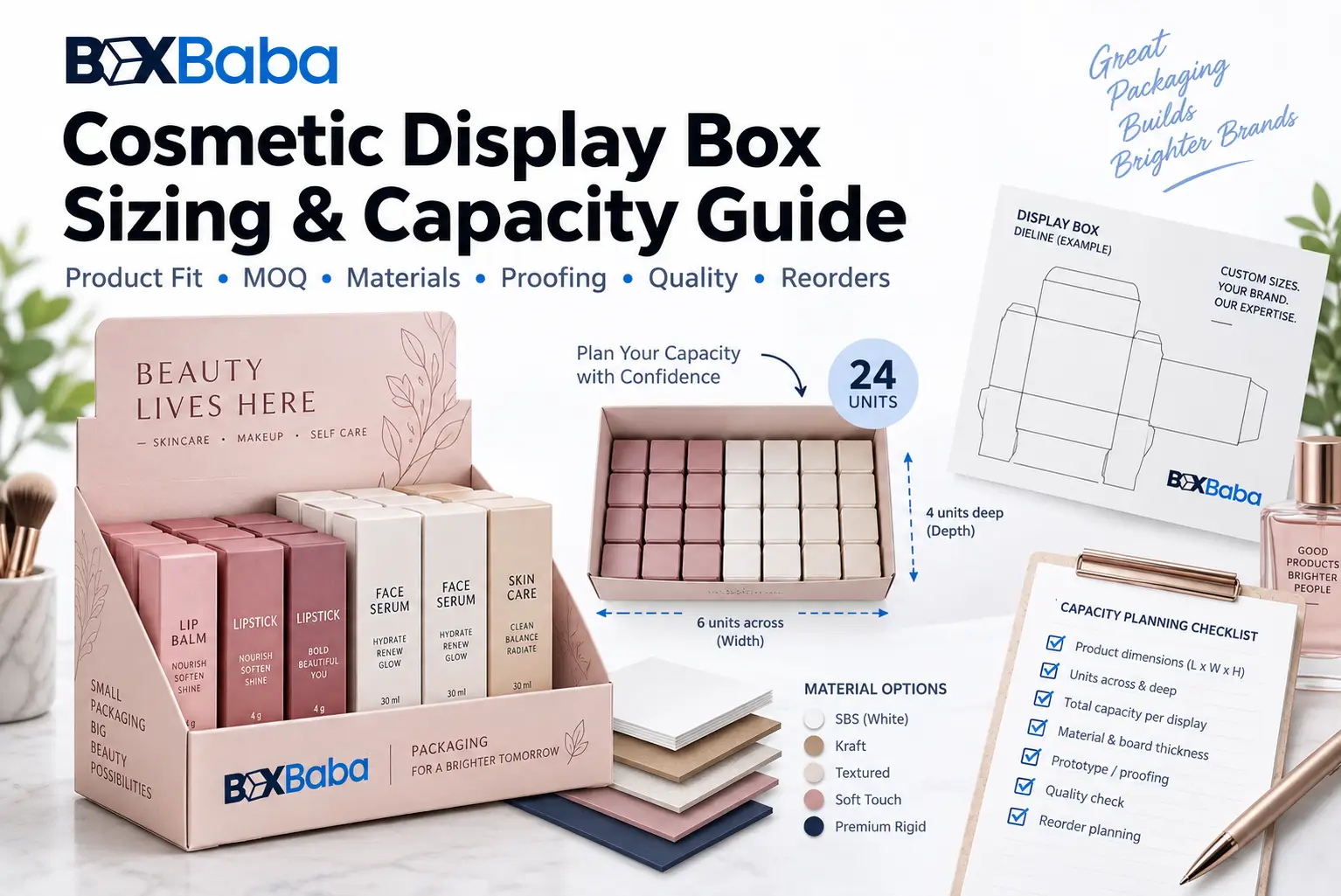
There is no single production-ready cosmetic display box size. A display that holds 24 lip balm cartons can be much narrower or deeper than a 24-unit display for mascara, skincare bottles or mixed cosmetic SKUs. The finished dimensions depend on the products, arrangement, customer access, retail space and display structure – not on unit count alone.
For display packaging, the measurement task begins after the individual retail-ready product has been defined. If a lipstick, serum or lip balm is already packed in its own carton, measure that finished carton. If the product will sit bare in the display, measure the complete bottle, jar, tube or accessory that will actually be merchandised.
Use this sequence: Retail-Ready Unit -> Maximum Unit Dimensions -> Front-Facing Panel -> Capacity -> Facings / Rows / Columns / Channels -> SKU Arrangement -> Retail Footprint Limit -> Loaded Weight -> Header / Tester / Divider Requirements -> Internal Display Layout -> External Display Dimensions -> Dieline
Brands ready to request pricing can review Cosmetic Display Boxes. If individual cosmetic products still need their own secondary cartons, start with Custom Cosmetic Boxes and the Cosmetic Box Size Guide.
Is There a Standard Cosmetic Display Box Size?
No. Display dimensions should be developed around the actual retail-ready units and the merchandising plan. Online standard sizes can be useful for concept planning, but they should not replace the finished product dimensions, retail-space limits and structural layout for the real project.
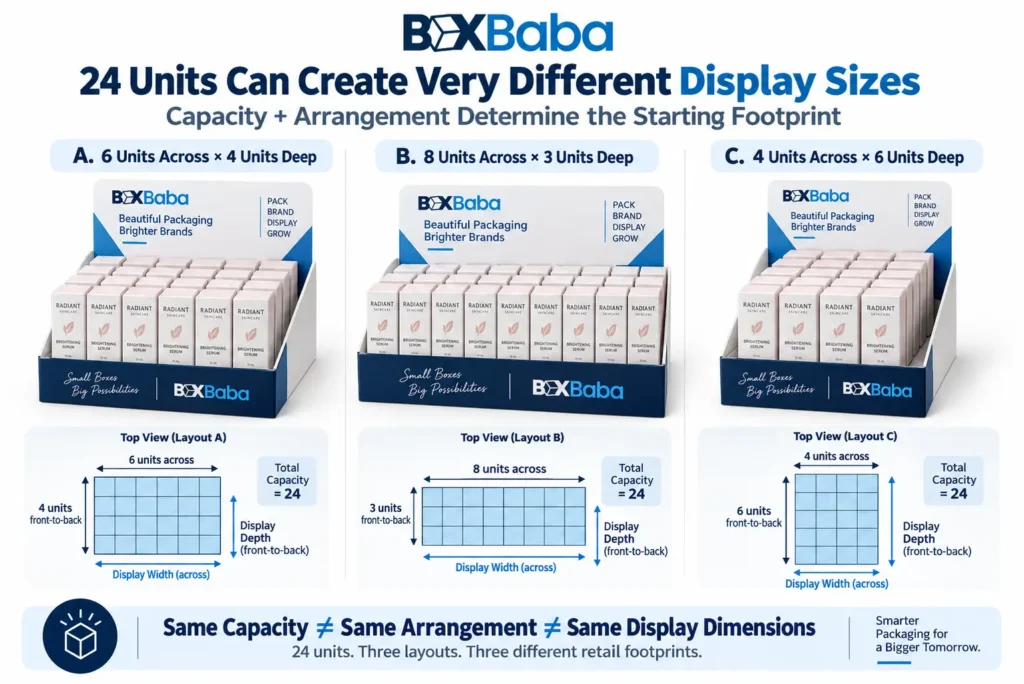
The core relationship is: Unit Count != Product Arrangement != Display Dimensions.
Two displays can both hold 24 products while using very different footprints. One may show 6 visible facings with 4 units behind each facing. Another may use 8 products across and 3 rows deep. A tiered layout may use the same 24 units across several levels. Capacity is therefore only one input.
What Does Display Box Size Actually Mean?
A cosmetic display has several dimensional layers. Buyers and suppliers should identify which one they are discussing rather than using the word size for everything.
Dimensional Entity | What It Describes |
|---|---|
Retail-ready unit dimensions | The finished box, bottle, jar, tube or accessory placed in the display |
Compartment / channel dimensions | Usable space assigned to one SKU, one facing or one product lane |
Usable merchandise area | The internal area occupied by the complete arranged products |
External display footprint | Finished width and depth of the display on the counter or shelf |
Product presentation height | Height of the visible product area / front stop / tiers |
Overall display height | Finished display including any raised header, riser or back panel |
These are related but not interchangeable. Product dimensions do not automatically equal channel dimensions, and usable merchandise width does not automatically equal the outside display width because side walls, dividers, folded construction and other structural components also occupy space.
Measure the Retail-Ready Product First
Measure the exact unit that the shopper will see inside the display. If the display contains individually boxed products, measure the finished outside cartons. If it contains bare cosmetic products, measure the complete filled and closed product at its maximum points.
For a bare product, include caps, pumps, droppers, applicator closures, overcaps, collars and decorative projections that affect the outside profile. For irregular products, record maximum width, maximum depth and complete height rather than measuring only the main body.
Product Information to Record Before Capacity Planning
Input | What to Confirm |
|---|---|
Product format | Bare bottle/jar/tube/accessory or individually boxed retail unit |
Maximum width | Widest finished point |
Maximum depth | Deepest finished point |
Maximum height | Complete finished height |
Diameter | For a truly round finished product where relevant |
Finished unit weight | One complete retail-ready unit |
Front-facing panel | Which side should face the shopper |
Removal direction | Lift, pull forward, slide or another action |
Replenishment direction | How retail staff refill the display |
SKU identity | Shade, fragrance, formula, style or product family |
Product Count Is Not the Same as Display Capacity Planning
A requested capacity such as 12, 18, 24 or 36 units tells you how many products the display should hold. It does not tell you how those products should be arranged.
Capacity becomes meaningful only when it is connected to layout. For a simple rectangular arrangement where every position holds one unit, a conceptual relationship is: Total Capacity = Units Across x Units Front-to-Back. If a display is tiered or uses channels that hold several units, the calculation changes.
Do not force every display into one formula. Use the formula that matches the actual structure and replenishment method.
Facings, Rows, Columns and Depth: Use the Terms Consistently
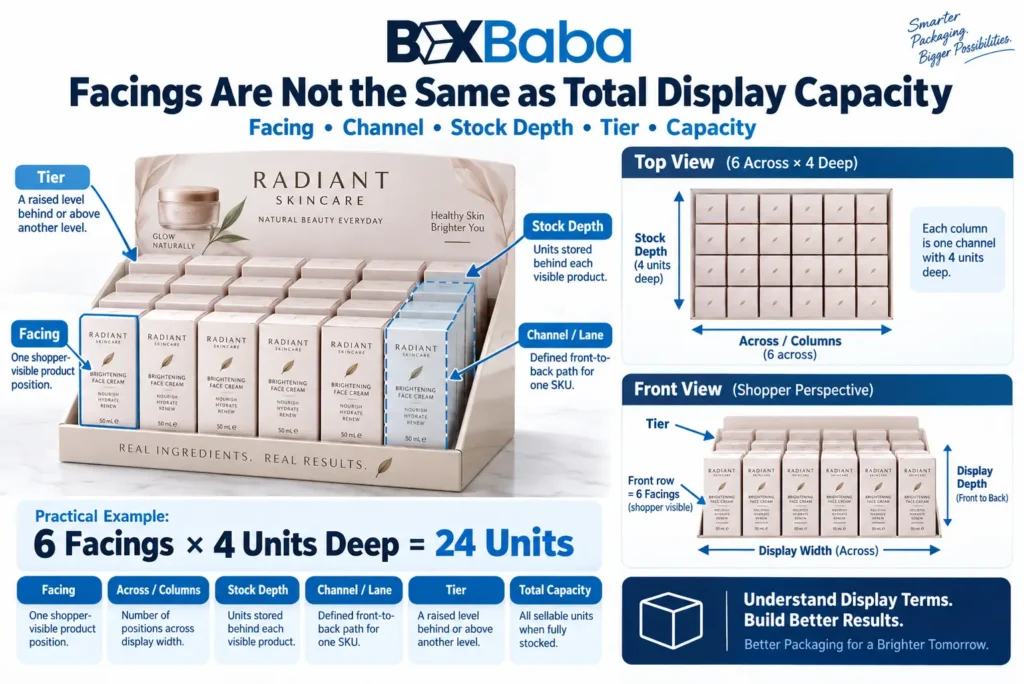
Retail teams often care about facings – the number of product positions visible across the front. Packaging teams may also describe rows, columns, channels or units deep. Agree on the terminology before the dieline is developed.
Term | Practical Meaning |
|---|---|
Facing | One visible product position presented toward the shopper |
Across / columns | Number of product positions across the display width |
Front-to-back / depth | Number of units stored behind a front position |
Channel / lane | Defined path or compartment holding one product or SKU sequence |
Tier | Raised presentation level above or behind another product level |
Total capacity | All units the display is intended to hold when fully stocked |
Example: a display with 6 visible facings and 4 units stored in each facing lane has a nominal product capacity of 24 units. That does not yet define the final display dimensions because channel clearance, dividers, walls, front stops and other structural features still need to be developed.
Calculate the Starting Product Grid - Not the Final Box
For a simple grid of equally sized individually boxed cosmetics, a starting merchandise footprint can be estimated from the product dimensions and planned arrangement. This is useful for concept development but should not be labeled as the finished display size.
Starting Merchandise Width = Product Width x Number Across. Starting Merchandise Depth = Product Depth x Number Front-to-Back.
The finished display still has to account for project-specific clearance, divider thickness, side walls, front stops, back panel, board thickness, folds, tabs, tiers and other structural features.
Worked Example: 24 Individually Boxed Lip-Care Units
Consider a hypothetical retail carton measuring 0.85 in wide x 0.85 in deep x 3.10 in high. The merchandising plan calls for 6 visible positions across and 4 units front-to-back.
Starting merchandise width = 0.85 x 6 = 5.10 in. Starting merchandise depth = 0.85 x 4 = 3.40 in. Nominal capacity = 6 x 4 = 24 units.
The display should not be specified as exactly 5.10 x 3.40 in. Those values describe only the theoretical product grid. The final display needs the approved channel spacing or dividers, front stop, side walls, back structure, header and selected material construction.
Facings and Stock Depth Can Be More Useful Than Rows x Columns
For many counter displays, the shopper sees a set number of products across the front while additional stock sits behind each one. In that case, planning by facings and stock depth is often clearer than describing the layout only as rows and columns.
For example: 5 facings x 3 units deep = 15 units. If each facing represents a different lipstick shade, the display also communicates SKU allocation: one channel per shade, three units per shade.
Multi-SKU Displays Need a Capacity Plan by SKU
Cosmetic displays frequently contain several shades, fragrances, formulas or product formats. Do not approve total capacity without confirming how many units of each SKU belong in the display and where they will sit.
SKU Planning Input | What to Confirm |
|---|---|
SKU count | Number of shades, formulas, fragrances or product types |
Units per SKU | Stock allocated to each SKU |
Assigned position | Facing, channel, compartment, tier or row |
Product dimensions | Maximum W x D x H for that SKU |
Unit weight | Finished weight of one unit |
Front-facing panel | Which panel or label faces the shopper |
Identification | Shade name, number, color cue, barcode or product code |
Replenishment | How staff refill that SKU position |
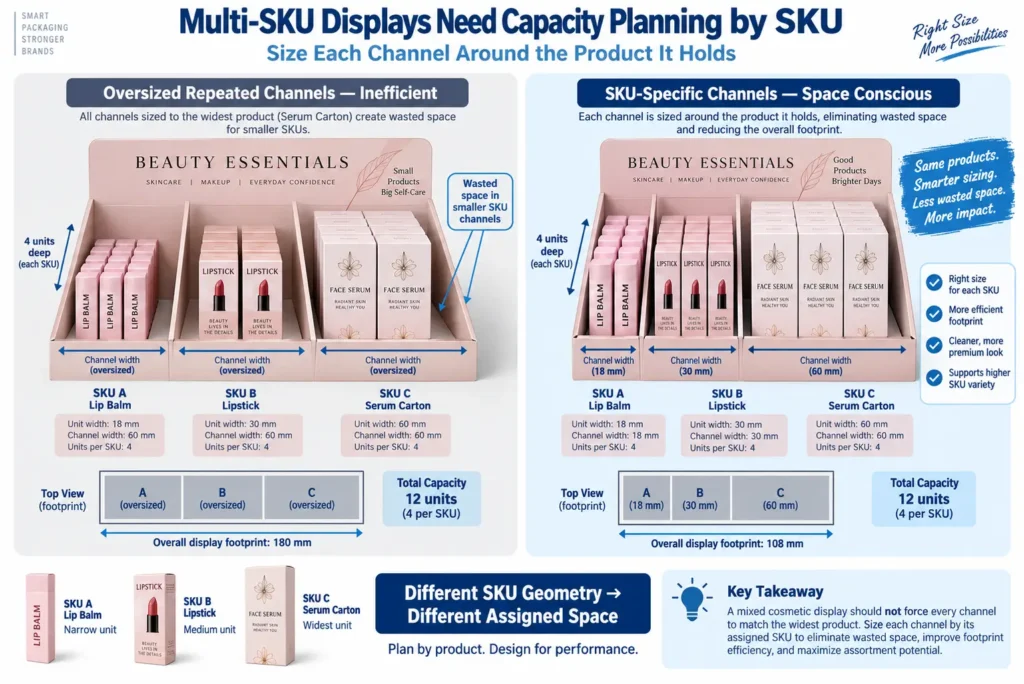
If all SKUs use the same physical carton, one repeated channel size can be efficient. If the physical products differ materially, the assigned compartments should be developed around the actual approved sizes rather than forcing every product into one oversized repeated lane.
The Largest Product Does Not Always Need to Control the Entire Display
In a mixed-SKU display, using the largest product dimension for every position can unnecessarily increase the footprint. Instead, group compatible products where practical and size each defined compartment around the products actually assigned to it.
For a single compartment that will accept several approved SKUs, the largest compatible assigned product can establish the starting cavity. That does not mean one large product should automatically control unrelated channels elsewhere in the display.
Retail Footprint Limits Can Override the Preferred Capacity
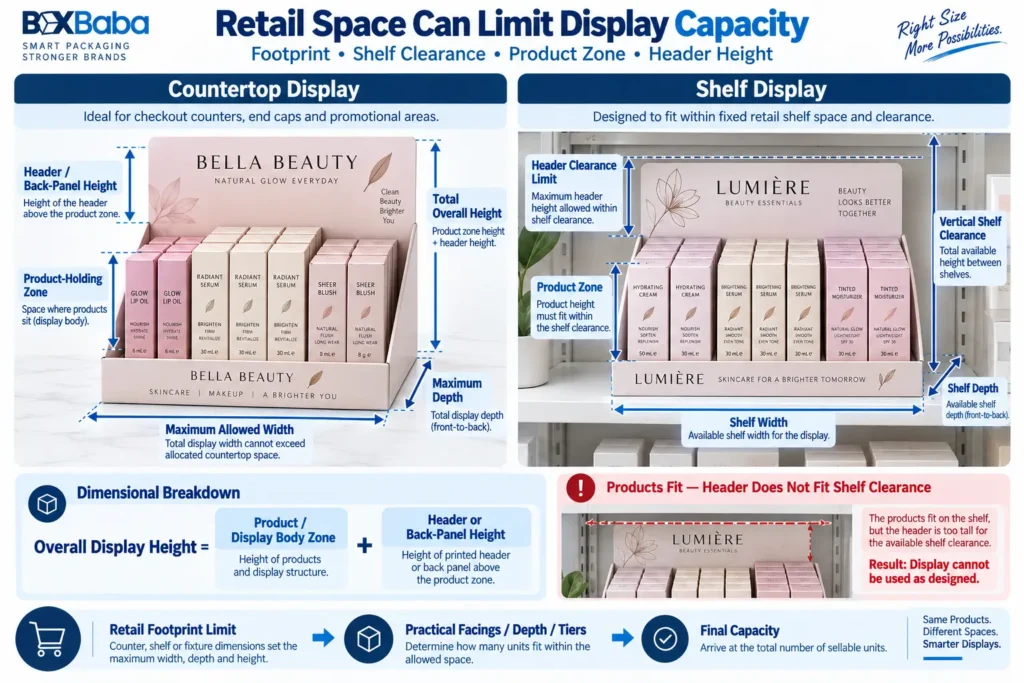
A retailer may provide maximum counter or shelf dimensions. When that happens, the display cannot be planned only from the desired unit count. The available width, depth and height become hard design constraints.
Use: Retail Footprint Limit -> Product Dimensions -> Maximum Practical Facings / Depth / Tiers -> Final Capacity.
If the desired capacity does not fit within the approved footprint, the options may include reducing units per display, changing orientation, using deeper stock lanes, using tiers, separating the assortment into more than one display or revising the product mix. The appropriate option depends on the actual retail program.
Countertop and Shelf Displays Have Different Space Constraints
A countertop display may be limited by checkout-space width and depth, while a shelf display may also need to fit between shelves and maintain a defined front edge. Record the maximum available width, depth and overall height for the real retail location whenever those limits are known.
Do not design a tall header in isolation and then discover that the complete display exceeds shelf clearance.
Header Height Is Separate From Product Capacity
A raised header or back panel creates brand and campaign space, but it also changes the total display height. Confirm the product presentation height and the permitted overall height separately.
Overall Height = Display Body / Product Zone + Approved Header or Back-Panel Height, subject to the actual structural design.
Header artwork should be finalized after the structure, fold lines, product sightlines and available retail clearance have been confirmed.
Front-Stop Height Affects Product Retention and Customer Access
The front panel or stop should be high enough to support the planned merchandise position without unnecessarily covering the product information shoppers need to see. Its final height should be developed around the product height, center of gravity, removal direction and display structure.
There is no universal front-stop percentage that fits every cosmetic product. A tall lightweight carton and a short glass jar can require different structural treatment.
Customer Removal and Replenishment Need Space
A display can fit products dimensionally and still be awkward to use. Confirm how shoppers remove a product and how staff replenish the display.
Possible removal methods include lifting from the top, pulling forward, sliding from a channel or removing from a die-cut opening. Replenishment can occur from the top, rear or front depending on the structure.
Finger access, channel opening, stop height and refill direction should be considered before the final display dimensions and dieline are approved.
Bare Bottles and Tubes Need Different Display Planning From Boxed Cosmetics
Individually boxed products provide flat rectangular surfaces that can simplify repeated rows or channels. Bare tubes, bottles and jars may need shaped openings, dividers, platforms or other positioning features depending on the merchandising function.
For a bare product, measure its complete finished geometry first. Then decide whether the display can use direct fit, an integrated die-cut feature, a partition or another internal component. Do not begin by choosing an insert material before the required function is clear.
For a broader support decision framework, see When Do Cosmetic Boxes Need Inserts?.
Punch-Insert and Die-Cut Opening Displays
A die-cut opening can position a lipstick tube, lip balm, mini bottle, beauty accessory or other bare product. The opening should be developed around the relevant finished profile and the insertion/removal method.
Measure the maximum product cross-section, the part of the product intended to pass through the opening, the seated depth and any closure or projection that could prevent loading. Do not assume the opening should equal the product diameter exactly.
Tiered and Stepped Displays Need a Layer-by-Layer Capacity Plan
A tiered display raises rear products to improve visibility. Capacity should be planned for each tier separately because the product count, tier width, tier depth and vertical offset can differ.
Total Capacity = Capacity of Tier 1 + Capacity of Tier 2 + Capacity of Additional Tiers.
The vertical rise should be established around product height and desired visibility rather than copied from a generic display. Taller rear products may need less rise than short products, while tester areas or mixed-height collections may use a different step sequence.
Tester Areas Reduce Sellable Product Capacity
If a display includes testers, applicators, swatches or sample products, those areas consume part of the available footprint. Count tester positions separately from sellable inventory.
Display Footprint = Sellable Product Area + Tester / Accessory Area + Structural Components.
A 24-unit sales target plus two tester positions is not the same layout problem as a display that only needs 24 sellable units.
Loaded Weight Is a Display-Sizing Input
Dimensions explain the footprint; weight explains the load the completed display will carry. Record the finished weight of one retail-ready unit and the planned unit count.
Product Load = Finished Unit Weight x Number of Units, when all units share the same weight. For mixed-SKU displays, add the product load for each SKU separately.
The complete loaded display weight also includes the display structure, dividers, platforms, testers and other components. Higher load does not automatically dictate one specific material; it is an input for structural evaluation.
Mixed Weights and Centers of Gravity Need Review
A display containing small lightweight cartons behaves differently from a display containing filled glass skincare bottles. If products are tall, heavy or unevenly distributed, record the intended arrangement and avoid concentrating the heaviest units where the structure was not designed for them.
Weight should be reviewed together with footprint, product height, tier location, replenishment and structure rather than used as a standalone rule.
Display Capacity by Channel or Lane
Some cosmetic displays use narrow channels with several units stored front-to-back. In that case, define the number of channels and the number of units each channel should hold.
Conceptually: Total Capacity = Sum of the Units Assigned to All Channels.
If every channel holds the same quantity, a simplified planning relationship is: Number of Channels x Units per Channel = Nominal Capacity. The final channel width and depth still depend on the approved product geometry and structural spacing.
Worked Example: Three-SKU Channel Display
Consider a hypothetical cosmetic display with three SKUs. SKU A is 0.90 in wide, SKU B is 0.95 in wide and SKU C is 1.00 in wide. Each SKU receives one channel with four units stored front-to-back.
Nominal capacity = 3 channels x 4 units = 12 units. A naive design might repeat a 1.00 in channel three times simply because SKU C is widest. A more space-conscious structure can instead develop each assigned channel around its approved product where the design allows different channel widths.
The actual display width still needs divider thickness, side walls, clearance and structure. The example demonstrates why mixed-SKU capacity planning should begin from the assigned products rather than an average width or one repeated standard compartment.
Can Multiple Cosmetic SKUs Share One Display Dieline?
Yes, when the physical products and merchandising arrangement remain compatible. Different lipstick shades, lip balm flavors or fragrance variations can often share one display structure when the retail-ready units have the same dimensions and the same capacity plan.
Same Physical Unit Geometry + Same Arrangement -> Shared Display Dieline -> Multiple Artwork / SKU Programs.
A structural review is appropriate when a SKU changes product size, weight, facing direction, quantity per display, tester requirement, channel width or retail footprint.
Product Orientation Can Change the Entire Display Footprint
The same retail carton can be presented upright, flat or on its side. Each orientation changes which dimension drives display width, depth and height.
Confirm the shopper-facing panel before calculating the product grid. Orientation can also affect barcode visibility, shade identification, removal and replenishment.
Retail Display and Ecommerce Shipping Packaging Are Different Layers
A cosmetic display is developed for merchandising products at retail. The outer package used to transport the completed display or ship ecommerce orders is a different packaging layer.
Retail: Retail-Ready Products -> Cosmetic Display. Distribution / Ecommerce: Completed Unit Packages or Displays -> Outer Shipping / Master Carton.
Do not treat the counter-display footprint as the shipping-carton dimensions, and do not describe a retail display as distribution-validated unless the completed system has been evaluated for that specific project.
For the broader distinction between retail and ecommerce layers, see Retail vs Ecommerce Cosmetic Packaging.
Finished Display Dimensions vs Flat Dieline Dimensions
Finished display dimensions describe the assembled counter or shelf unit. The dieline describes the flat production layout before cutting, creasing, folding, gluing and assembly. They are different dimensional systems.
A display dieline may contain the tray base, side walls, front stop, back panel, header, partitions, tabs, locks, tear-away areas, glue flaps and other structural components. The flat dieline is therefore larger and more complex than the finished retail footprint.
Use: Approved Loaded Layout -> Finished Display Dimensions -> Structural Dieline -> Artwork.
Common Cosmetic Display Sizing Mistakes
Mistake | Why It Creates a Weak Specification | Better Direction |
|---|---|---|
Choosing a display from unit count alone | 24 products can use many different layouts | Define product geometry + facings / rows / channels |
Measuring the bare cosmetic when it will be individually boxed | The retail carton is the unit that enters the display | Measure the finished retail-ready unit |
Using product width x count as the final display width | Walls, dividers, spacing and structure are missing | Treat it only as a starting merchandise grid |
Confusing facings with total capacity | Visible positions may hold stock behind them | Record facings and units per facing/channel |
Using the largest SKU for every compartment | Can unnecessarily increase footprint | Size each assigned compartment around compatible products |
Ignoring retailer footprint limits | The planned capacity may not fit the counter/shelf | Confirm max W/D/H early |
Ignoring header clearance | Overall display can exceed shelf height | Separate body height from total height |
Ignoring removal / replenishment | Products can fit but be hard to access | Plan shopper and staff access |
Ignoring testers | Tester zones reduce sellable product space | Count tester area separately |
Ignoring loaded weight | Footprint alone does not describe the structural load | Record unit and complete loaded weight |
Treating the display as the shipping package | Different packaging layers | Plan outer shipping separately |
Finalizing artwork before the dieline | Header, walls and safe zones can change | Approve structure first |
Cosmetic Display Box Sizing and Quote Checklist
- Product type and whether each item is bare or individually boxed.
- Maximum W x D x H or diameter for every retail-ready SKU.
- Finished unit weight for every SKU.
- Shopper-facing panel / label orientation.
- Desired total capacity.
- Number of SKUs and units per SKU.
- Number of visible facings, channels, rows, columns or tiers if already planned.
- Units front-to-back in each channel or facing where relevant.
- Maximum counter or shelf footprint: width, depth and overall height.
- Tester, sample or accessory positions.
- Divider, partition, punch opening or raised-platform requirement if known.
- Customer removal direction and staff replenishment direction.
- Header / back-panel requirement and available vertical clearance.
- Complete loaded weight target or the inputs needed to calculate it.
- Preferred display style if already selected.
- Artwork status, number of artwork versions and quantity per display SKU.
- Outer shipping / master-carton requirement and delivery destination.
This gives a packaging supplier a stronger starting specification than saying only, I need a display for 24 cosmetic products.
From Retail-Ready Products to the Final Cosmetic Display
- Retail-Ready Product Dimensions
- Front-Facing Orientation
- Unit Weight
- Capacity by SKU
- Facings / Rows / Columns / Channels / Tiers
- Retail Footprint Limits
- Tester / Accessory / Divider Requirements
- Customer Removal + Replenishment
- Complete Loaded Layout
- Internal Display Structure
- External Display Dimensions
- Structural Dieline
- Artwork
- Proof / Fit Confirmation
Brands ready to develop a display around their actual cosmetic products, capacities and retail footprint can review BoxBaba Custom Cosmetic Display Boxes.
Frequently Asked Questions About Cosmetic Display Box Sizes
What is the standard cosmetic display box size?
There is no universal production-ready size. The correct display depends on the retail-ready product dimensions, capacity, SKU arrangement, facings, stock depth, retail footprint, loaded weight and selected display structure.
Does 24 units determine the display dimensions?
No. Twenty-four units can be arranged in several ways, such as 6 facings with 4 units deep or 8 positions across with 3 rows. Different products and layouts create different footprints.
What should I measure before sizing a cosmetic display?
Measure every retail-ready SKU that will enter the display, including its maximum width, depth, height or diameter, finished unit weight, shopper-facing panel and removal direction.
Should I measure the cosmetic product or its individual carton?
Measure the exact item that will sit in the display. If the cosmetic is already individually boxed, use the finished outer carton dimensions. If it is displayed bare, measure the complete filled and closed product.
What is a facing in a cosmetic display?
A facing is one visible product position presented toward the shopper. A facing may have additional units stored behind it, so the number of facings can be lower than the total capacity.
How do I calculate display capacity?
Use the formula that matches the structure. For a simple grid, capacity may equal units across multiplied by units front-to-back. For channel displays, add the units assigned to each channel. For tiered displays, add the capacity of each tier.
Are the product-grid dimensions the same as the final display dimensions?
No. A calculated product grid is only a starting merchandise area. The final display also includes project-specific clearance, walls, dividers, front stops, headers, folds and other structural components.
How do I plan a multi-SKU cosmetic display?
Record the dimensions, weight, units per SKU, assigned position and facing direction for every SKU. Size each compartment around the products actually assigned to it rather than automatically using one oversized repeated channel.
Can different cosmetic shades share one display dieline?
Yes, when the physical retail-ready units, capacity, arrangement, footprint and structural requirements remain compatible. Artwork or shade-name changes alone do not necessarily require a new display dieline.
Do cosmetic displays need dividers or inserts?
Not automatically. Dividers, partitions or die-cut supports are used when the merchandising layout needs defined separation, product positioning, mixed-SKU organization or another internal function.
How does a tester area affect capacity?
Tester and accessory areas consume part of the available display footprint. Count them separately from sellable inventory before the final unit capacity is approved.
Why is loaded weight important?
Loaded weight helps describe the structural load of the fully stocked display. It should be reviewed together with product dimensions, layout, tiers, footprint and material construction.
Is a cosmetic display box the same as an ecommerce shipping box?
No. The display is a retail merchandising structure. An ecommerce mailer, master carton or shipping case is a separate outer packaging layer developed around the completed order or display.
Should I finalize display artwork before the dieline?
No. Approve the structure, dimensions, header, dividers, product positions and artwork safe zones first, then apply final artwork to the approved dieline.